Chapter 03 — Prometheus
Prometheus is the de-facto standard for collecting, storing, and alerting on metrics in cloud-native environments. Deep understanding of TSDB internals, the scrape engine, and HA architecture is a prerequisite for building a reliable AIOps platform.
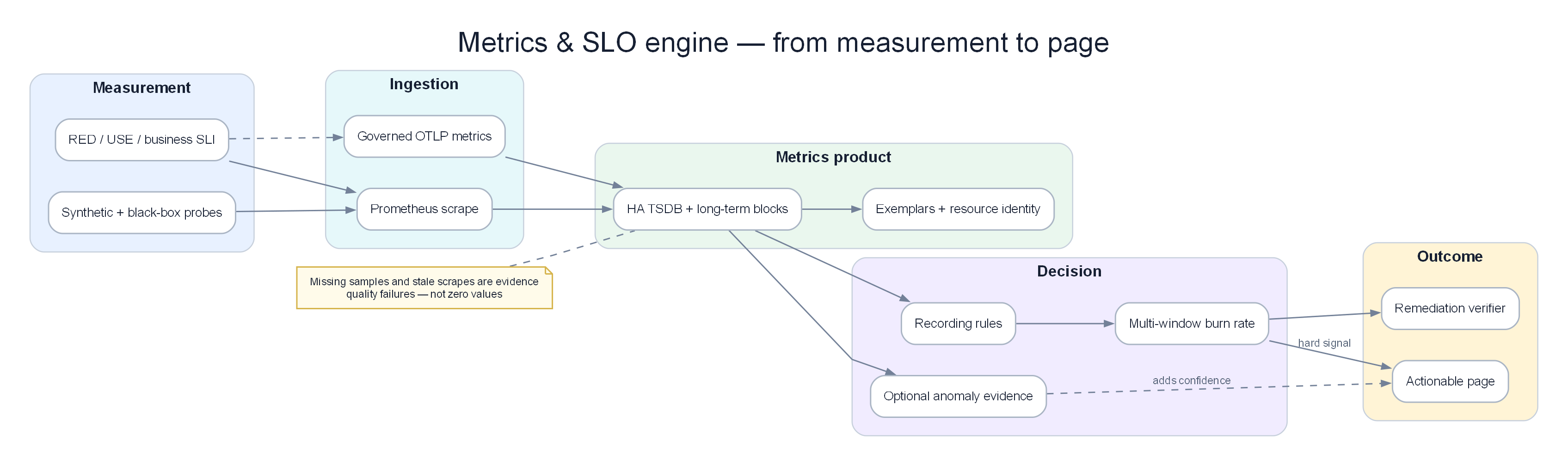
Poster: metric contracts become SLIs, multi-window burn rates, versioned features, and stateful decisions.
Prerequisites
- 01 — Observability — metric types and basic PromQL
- 02 — OpenTelemetry — how metrics flow into Prometheus
Related Documents
- 09 — Anomaly Detection — Prometheus metrics as input
- 10 — Alert Correlation — consumes alerts from Prometheus
Next Reading
After this chapter, continue to 04 — Loki.
1. Why Prometheus?
KEY IDEA
Prometheus was designed with a simple philosophy: pull-based scraping + multi-dimensional labels + PromQL. Instead of waiting for services to push data, Prometheus actively requests each service’s /metrics every 15 seconds. That makes it possible to know immediately when a service stops responding (no scrape response = down).
Tip
Why Pull instead of Push? Pull-based has three advantages: (1) Prometheus controls collection frequency and is not “spammed” by services; (2) If a service is down → Prometheus detects it immediately (scrape fail); (3) Easier to debug: you can curl the /metrics endpoint directly to see raw data. Trade-off: services in private networks need Pushgateway for short-lived batch jobs.
Design Philosophy
- Pull-based scraping: Prometheus polls targets; it does not wait for push. Easy to detect service down.
- Multi-dimensional data model: Labels are first-class citizens. Each time series =
metric_name{label_key="value"} - PromQL: A query language specialized for time series. Not SQL.
- No long-term storage: Only ~15 days local. Long-term storage via remote write → Thanos/VictoriaMetrics.
- Single binary: No external DB, no ZooKeeper required.
What Prometheus Is Good At
- Collecting metrics for infrastructure and application monitoring
- Dynamic service discovery (Kubernetes, EC2)
- Flexible PromQL queries
- Alert evaluation with complex expressions
What Prometheus Is NOT Good At
| Not suitable for | Alternative |
|---|---|
| Long-term storage (> 15 days) | Thanos or VictoriaMetrics |
| High-cardinality (> 10M series) | VictoriaMetrics |
| Horizontal write scaling | VictoriaMetrics Cluster |
| Event data (logs, traces) | Loki (logs), Tempo (traces) |
2. Internal Architecture
KEY IDEA
Prometheus is a monolith — everything in one binary: scrape engine, TSDB, rule evaluator, query engine, HTTP API. The data path is simple: Service → Scrape Engine → WAL → Head Block (memory) → TSDB Blocks (disk) → Remote Write (long-term).
graph TD
    subgraph Targets["Monitored Targets"]
        SVC[Microservices\n:8080/metrics]
        NODE[Node Exporter\n:9100/metrics]
        K8S[kube-state-metrics\n:8080/metrics]
    end

    subgraph Prometheus["Prometheus Server"]
        SD[Service Discovery\nKubernetes · EC2 · DNS]
        SCRAPE[Scrape Engine\nHTTP GET /metrics every 15s]
        WAL[Write-Ahead Log\n/prometheus/wal/]
        HEAD[Head Block\nin-memory 2h window]
        TSDB[TSDB Blocks\non-disk]
        RULES[Rule Evaluator\nRecording · Alerting]
        QENG[Query Engine PromQL]
        API[HTTP API :9090]
    end

    subgraph Remote["Remote Storage"]
        RW[Remote Write\n→ Thanos · VictoriaMetrics]
    end

    SD -->|discover targets| SCRAPE
    Targets -->|HTTP GET /metrics| SCRAPE
    SCRAPE -->|write samples| WAL
    WAL -->|persist| HEAD
    HEAD -->|compact every 2h| TSDB
    TSDB -->|query| QENG
    HEAD -->|query| QENG
    QENG --> API
    RULES -->|evaluate| QENG
    TSDB -->|remote_write| RW

    style Targets fill:#dbeafe,color:#1e293b
    style Prometheus fill:#dcfce7,color:#1e293b
    style Remote fill:#f3e8ff,color:#1e293b
Key Endpoints
| Endpoint | Description |
|---|---|
/api/v1/query |
Instant query |
/api/v1/query_range |
Range query (for dashboards) |
/api/v1/targets |
All discovered targets + health |
/api/v1/alerts |
Currently active alerts |
/api/v1/write |
Remote write endpoint |
/-/reload |
Reload config |
/-/ready |
Readiness check |
3. TSDB Internals
KEY IDEA
Prometheus’s TSDB (Time Series Database) uses two main mechanisms: WAL (Write-Ahead Log) to avoid data loss on crash, and XOR delta encoding (Facebook’s Gorilla algorithm) to compress data ~12x versus raw binary. If you store 1M series × 1 sample/15s → only ~7.5GB/day instead of 90GB if stored raw.
Data Organization
/prometheus/data/
├── 01HQRZ.../          ← Block (2h window)
│   ├── chunks/
│   │   ├── 000001      ← Compressed time series data
│   │   └── 000002
│   ├── index           ← Inverted index: label→series→chunks
│   └── meta.json       ← Block metadata
├── 01HQSA.../          ← Older block
└── wal/                ← Write-Ahead Log (newest data)
    ├── 00000000
    └── checkpoint.000000X/
Write Path
sequenceDiagram
    participant Scraper
    participant WAL
    participant HeadBlock
    participant DiskBlock

    Scraper->>WAL: append(series, timestamp, value)
    WAL-->>Scraper: write confirmed  ← First persistence
    Scraper->>HeadBlock: add to in-memory series

    Note over HeadBlock: Every 2 hours...
    HeadBlock->>DiskBlock: encode 120 samples → XOR chunk (~1.3 bytes/sample)
    DiskBlock->>DiskBlock: build inverted index
    DiskBlock->>WAL: truncate old WAL segments
WAL (Write-Ahead Log)
Important
WAL note: WAL corruption = data loss. Monitor prometheus_tsdb_wal_corruptions_total and alert when > 0.
prometheus_tsdb_wal_corruptions_total   # Alert when > 0
prometheus_tsdb_wal_replay_duration_seconds  # Replay time on restart
Restart time estimate: about 1 minute to replay each 1GB of WAL.
Chunk Encoding — XOR Delta (Gorilla Compression)
Tip
Why does Gorilla compression reach ~1.3 bytes/sample? Timestamps are usually evenly spaced at 15s → small deltas → even smaller delta-of-delta → encode in 1–2 bits. Values change little between scrapes → XOR is mostly zeros → compresses well.
Compared to raw storage: 8 bytes (float64) + 8 bytes (int64 timestamp) = 16 bytes/sample. With Gorilla: ~1.3 bytes/sample = 12x compression.
Storage estimate:
1 million active series
× 1 sample every 15 seconds
× 1.3 bytes/sample
× 86400 seconds/day
= 7.5 GB/day

15-day retention: 112 GB for 1M series @ 15s resolution
Block Compaction
Retention configuration:
# CLI flags when starting Prometheus
--storage.tsdb.retention.time=15d      # Delete data older than 15 days
--storage.tsdb.retention.size=500GB    # Or when exceeding 500GB
--storage.tsdb.path=/prometheus/data
4. The Scraping Engine
KEY IDEA
The scrape engine is a simple loop: every 15 seconds, Prometheus HTTP GETs /metrics on each target, parses Prometheus exposition format, applies relabeling rules, then writes into the TSDB. The hardest part is relabeling: using regex to filter/transform metric labels before storage — done wrong, you store junk in the TSDB.
Key Scrape Configuration
global:
  scrape_interval: 15s       # Scrape frequency — lower to 5s if you need higher resolution
  scrape_timeout: 10s        # MUST be < scrape_interval
  evaluation_interval: 15s   # Rule evaluation frequency

  external_labels:
    cluster: prod-us-east-1  # Required for Thanos deduplication
    replica: '$(POD_NAME)'   # Different between HA pair members

scrape_configs:
  - job_name: kubernetes-pods
    honor_labels: false      # Do not let targets override job/instance labels

    kubernetes_sd_configs:
      - role: pod

    relabel_configs:
      # Only scrape pods with annotation "prometheus.io/scrape: true"
      - source_labels: [__meta_kubernetes_pod_annotation_prometheus_io_scrape]
        action: keep
        regex: "true"

      # Use custom port from annotation
      - source_labels: [__address__, __meta_kubernetes_pod_annotation_prometheus_io_port]
        action: replace
        regex: ([^:]+)(?::\d+)?;(\d+)
        replacement: $1:$2
        target_label: __address__

      # Attach k8s metadata as labels
      - source_labels: [__meta_kubernetes_namespace]
        target_label: namespace
      - source_labels: [__meta_kubernetes_pod_name]
        target_label: pod

    metric_relabel_configs:
      # Drop high-cardinality Go runtime metrics before storage
      - source_labels: [__name__]
        action: drop
        regex: "go_gc_.*|go_memstats_alloc_bytes_total"
5. Service Discovery
KEY IDEA
Service discovery is why Prometheus works well in dynamic Kubernetes environments — no static target list required. Prometheus automatically discovers new pods/services/nodes and starts scraping as soon as they appear.
Kubernetes SD Roles
| Role | Discovers | Metadata labels |
|---|---|---|
node |
All K8s nodes | Node labels, annotations |
pod |
All pods | Pod labels, container info |
service |
All services | Service labels, annotations |
endpoints |
Service endpoint IPs | Pod + service metadata |
Standard Pod Annotations
# Add to Deployment/Pod spec so Prometheus scrapes automatically
metadata:
  annotations:
    prometheus.io/scrape: "true"
    prometheus.io/port: "8080"
    prometheus.io/path: "/actuator/prometheus"  # Spring Boot
Relabeling Reference
Actions:
- keep:      Drop targets that do NOT match the regex
- drop:      Drop targets that match the regex
- replace:   Replace label value with regex capture
- labelmap:  Copy labels matching regex
- labeldrop: Delete labels matching regex
- hashmod:   Hash label value modulo N (for sharding)
Important:
__meta_*labels are only available inrelabel_configs. After relabeling, all__meta_*are removed — only labels without the__prefix are written to the TSDB.
6. PromQL Deep Dive
KEY IDEA
PromQL has two vector types: Instant vector (value at one point in time) and Range vector (values over a time window). Most important functions (rate(), histogram_quantile()) need a Range vector. Common mistake: forgetting to wrap a counter in rate() → you see a number that only climbs, not a rate.
Selector Types
# Instant vector — all series at the current time
http_requests_total{job="api-server", status=~"5..", namespace!="test"}

# Range vector — values over 5 minutes — needed for rate()
http_requests_total[5m]

# Offset — look back 1 hour
http_requests_total offset 1h
Essential Functions
# rate — per-second increase of a counter (handles counter resets)
rate(http_requests_total[5m])

# histogram_quantile — compute P95/P99 from histogram buckets
histogram_quantile(0.95, rate(http_request_duration_seconds_bucket[5m]))

# increase — total increase over 1h (= rate × 3600)
increase(http_requests_total[1h])

# Aggregation operators
sum(rate(http_requests_total[5m])) by (service)
topk(5, rate(http_requests_total[5m]))
count(up == 1) by (job)
Common Production Queries
# Error rate by service — for SLO dashboards
sum by (service) (rate(http_requests_total{status=~"5.."}[5m]))
/
sum by (service) (rate(http_requests_total[5m]))

# SLO availability (30 days)
1 - (
  sum(rate(http_requests_total{status=~"5.."}[30d]))
  /
  sum(rate(http_requests_total[30d]))
)

# Latency P99 by service
histogram_quantile(0.99,
  sum by (service, le) (
    rate(http_request_duration_seconds_bucket[5m])
  )
)

# CPU throttling ratio (CPU-limited containers)
sum by (pod) (rate(container_cpu_cfs_throttled_seconds_total[5m]))
/
sum by (pod) (rate(container_cpu_cfs_periods_total[5m]))

# Kafka consumer lag (monitor AIOps pipeline)
sum by (consumer_group, topic) (
  kafka_consumer_group_current_offset - kafka_consumer_group_committed_offset
)
7. Recording Rules
KEY IDEA
Recording rules precompute expensive queries and store results as new metrics. Instead of every dashboard request computing P99 latency over 30 days of data, a recording rule computes it every 30 seconds and stores the result → dashboards load in <1 second instead of 30+ seconds.
Tip
Why are recording rules important for SLO alerting? Multi-window burn-rate alerting (e.g. 1h, 6h, 30d windows) without recording rules must compute directly → extremely expensive. Recording rules precompute error ratios for different windows.
groups:
  - name: http.rules
    interval: 30s   # Evaluate every 30s
    rules:
      # Pre-compute request rate by service
      - record: job:http_requests:rate5m
        expr: sum by (job) (rate(http_requests_total[5m]))

      # Pre-compute error rate — for SLO burn-rate alerting
      - record: job:http_error_rate:ratio5m
        expr: |
          sum by (job) (rate(http_requests_total{status=~"5.."}[5m]))
          /
          sum by (job) (rate(http_requests_total[5m]))

      # Pre-compute P99 latency
      - record: job:http_request_duration_p99:5m
        expr: |
          histogram_quantile(0.99,
            sum by (job, le) (
              rate(http_request_duration_seconds_bucket[5m])
            )
          )

      # Pre-compute for multi-window burn-rate alerting
      - record: job:http_error_rate:ratio1h
        expr: |
          sum by (job) (rate(http_requests_total{status=~"5.."}[1h]))
          /
          sum by (job) (rate(http_requests_total[1h]))

      - record: job:http_error_rate:ratio6h
        expr: |
          sum by (job) (rate(http_requests_total{status=~"5.."}[6h]))
          /
          sum by (job) (rate(http_requests_total[6h]))
Naming convention: level:metric:operation_range
8. Alerting Rules and Alertmanager
KEY IDEA
The alert pipeline in Prometheus works through two components: Prometheus (evaluates alert rules every 15 seconds) and Alertmanager (receives alerts, deduplicates, groups, routes to the right channels). Alertmanager is a “smart router” — it knows: “this alert belongs to the payments team → send to #payments-oncall”, “severity=critical → PagerDuty immediately”, “this alert is a child of cluster down → silence (inhibit)”.
Alert Rule Structure
groups:
  - name: service.alerts
    rules:
      - alert: ServiceHighErrorRate
        expr: job:http_error_rate:ratio5m > 0.05   # Use a recording rule!
        for: 5m                 # Must be true continuously for 5 minutes before firing
        labels:
          severity: critical
          runbook: "https://runbooks.internal/high-error-rate"
        annotations:
          summary: "High error rate on {{ $labels.job }}"
          description: |
            Error rate {{ $value | humanizePercentage }} (threshold: 5%)
          dashboard: "https://grafana.internal/d/service-overview?var-job={{ $labels.job }}"
Alertmanager Architecture
graph TD
    PROM[Prometheus Alert Rule\nfires every 15s] --> AM[Alertmanager]

    subgraph AM["Alertmanager Processing"]
        RECV[Receive] --> DEDUP[Deduplicate\n from HA pair]
        DEDUP --> GROUP[Group\nby team/service]
        GROUP --> INHIB[Inhibit\nsilence child if parent fires]
        INHIB --> ROUTE[Route\nby label matchers]
    end

    ROUTE -->|severity=critical| PD[PagerDuty]
    ROUTE -->|severity=warning| SLACK[Slack]
    ROUTE -->|all| AIOPS[AIOps Webhook]
    ROUTE -->|watchdog| WD[Dead Man's Switch]
Alertmanager Configuration
global:
  resolve_timeout: 5m

route:
  receiver: slack-default
  group_by: [alertname, cluster, service]
  group_wait: 30s       # Wait before sending the first alert in a group
  group_interval: 5m    # Wait before sending updates for a group
  repeat_interval: 12h  # Resend if alert is still firing

  routes:
    # Critical → PagerDuty immediately
    - match:
        severity: critical
      receiver: pagerduty
      group_wait: 0s    # Do not wait for critical
      continue: true    # Continue routing other rules

    # All → AIOps correlation engine
    - match_re:
        severity: "critical|warning"
      receiver: aiops-webhook
      continue: true

    # Dead man's switch
    - match:
        alertname: DeadMansSwitch
      receiver: watchdog
      repeat_interval: 5m

inhibit_rules:
  # If cluster down → silence service-level warnings
  - source_match:
      alertname: KubernetesNodeDown
    target_match:
      severity: warning
    equal: [cluster]

  # If service down → silence ServiceHighErrorRate
  - source_match:
      alertname: ServiceDown
    target_match:
      alertname: ServiceHighErrorRate
    equal: [job, namespace]

receivers:
  - name: pagerduty
    pagerduty_configs:
      - routing_key_file: /etc/alertmanager/pagerduty-key
        severity: "{{ if eq .CommonLabels.severity \"critical\" }}critical{{ else }}warning{{ end }}"

  - name: aiops-webhook
    webhook_configs:
      - url: http://aiops-correlation-engine.aiops.svc.cluster.local:8080/api/v1/alerts
        send_resolved: true
        max_alerts: 0     # Send all alerts, no limit

  - name: watchdog
    webhook_configs:
      - url: https://hc-ping.com/${HC_UUID}   # healthchecks.io
Alertmanager Clustering (HA)
Tip
Why a 3-node Alertmanager cluster? Alertmanager uses a gossip protocol (memberlist) to deduplicate notifications. If both Prometheus-0 and Prometheus-1 (HA pair) fire the same alert, only 1 of the 3 Alertmanager nodes sends the notification to PagerDuty. Without a cluster → you get 2 pages for the same incident.
# Start with cluster peers
alertmanager \
  --cluster.listen-address=0.0.0.0:9094 \
  --cluster.peer=alertmanager-1.alertmanager.svc:9094 \
  --cluster.peer=alertmanager-2.alertmanager.svc:9094 \
  --cluster.peer=alertmanager-3.alertmanager.svc:9094
9. Remote Write and Remote Read
KEY IDEA
Remote write is how Prometheus sends data out for long-term storage. Prometheus writes to the local WAL first; then a WAL tail reader batches samples and sends them to Thanos/VictoriaMetrics over HTTP. If remote write lags (queue grows) → old data is dropped. That is why you must monitor prometheus_remote_storage_pending_samples.
Remote Write Configuration
remote_write:
  - url: https://thanos-receiver.observability.svc:19291/api/v1/receive

    bearer_token_file: /etc/prometheus/remote-write-token
    tls_config:
      ca_file: /certs/ca.crt

    # Most important tuning
    queue_config:
      capacity: 10000           # Samples in memory before blocking
      max_shards: 50            # Parallel send goroutines (increase under high traffic)
      min_shards: 5
      max_samples_per_send: 5000
      batch_send_deadline: 5s

    # Only send SLO-related metrics out — reduce cost
    write_relabel_configs:
      - source_labels: [__name__]
        action: keep
        regex: "job:.*|slo:.*|recording:.*"
Monitoring the remote write queue:
# Samples waiting to be sent — if continuously rising → trouble
prometheus_remote_storage_pending_samples

# Failed samples — must be = 0
prometheus_remote_storage_failed_samples_total

# Alert when queue lag > 2 minutes
- alert: PrometheusRemoteWriteBehind
  expr: |
    (time() - prometheus_remote_storage_queue_highest_sent_timestamp_seconds) > 120
  for: 5m
  labels:
    severity: critical
10. High Availability
KEY IDEA
HA Pair is the minimal model: 2 identical Prometheus instances scraping the same targets. If one instance crashes, the other still runs. Problem: the two instances store data separately → query results can differ slightly. Solution: Thanos Query as a deduplication layer in front.
HA Pair Architecture
graph TD
    subgraph Targets
        T1[Service A]
        T2[Service B]
    end

    subgraph HA["Prometheus HA Pair"]
        P1[Prometheus-0\nexternal_label: replica=0]
        P2[Prometheus-1\nexternal_label: replica=1]
    end

    subgraph AM["Alertmanager Cluster (3 nodes)"]
        AM1[AM-0] <-->|gossip| AM2[AM-1] <-->|gossip| AM3[AM-2]
    end

    T1 -->|scrape| P1
    T1 -->|scrape| P2
    T2 -->|scrape| P1
    T2 -->|scrape| P2

    P1 -->|alerts| AM1
    P1 -->|alerts| AM2
    P2 -->|alerts| AM1
    P2 -->|alerts| AM2

    style HA fill:#dcfce7,color:#1e293b
    style AM fill:#f3e8ff,color:#1e293b
11. Prometheus vs CloudWatch
| Criterion | Prometheus | AWS CloudWatch |
|---|---|---|
| Model | Pull (scrape) | Push (PutMetricData) |
| Query language | PromQL (very powerful) | Metric Math (basic) |
| Retention | 15d local, unlimited via Thanos | 15 months (coarser resolution over time) |
| Cardinality | Unbounded (RAM-bound) | 30 dimensions/metric max |
| Cost (1M metrics/day) | ~$5–20/month (infra) | ~$300/month ($0.30/metric) |
| AWS integration | Via CloudWatch Exporter | Native |
| Multi-cloud | ✅ | ❌ AWS only |
Recommendation:
AWS infrastructure metrics:   → CloudWatch (free for EC2/RDS/EKS)
Application metrics:          → Prometheus (much cheaper at scale)
Hybrid approach:              → CloudWatch Exporter → Prometheus
                                 Unified query in one Grafana
12. Prometheus vs VictoriaMetrics
KEY IDEA
VictoriaMetrics is a “drop-in replacement” for Prometheus — compatible API, compatible PromQL, but much higher performance: 5–10x write throughput, 2–3x better compression, 5–10x less RAM. Trade-off: smaller ecosystem, not a CNCF standard.
| Criterion | Prometheus | VictoriaMetrics |
|---|---|---|
| Write throughput | ~1M samples/s | ~5-10M samples/s |
| Compression | ~1.3 bytes/sample | ~0.4-0.8 bytes/sample |
| RAM usage | High (head block in memory) | 5-10x lower |
| Horizontal write scaling | ❌ | ✅ (VM Cluster) |
| PromQL compatibility | Native | 99% + extensions |
| Active series limit | ~10M (OOM risk) | 50M+ |
| Deduplication | Via Thanos | Built-in |
When to move to VictoriaMetrics:
- Cardinality > 5M active series
- RAM is constrained
- Write load > 2M samples/second
- You want horizontal scaling without Thanos complexity
13. Thanos Architecture
KEY IDEA
Thanos solves three Prometheus problems: (1) Long-term storage — automatically upload TSDB blocks to S3; (2) HA deduplication — the Query component recognizes the replica label and dedups data from 2 Prometheus instances; (3) Global view — query across multiple clusters through one endpoint. The cost: 6–7 components to operate.
graph TD
    subgraph Prom["Prometheus HA Pair"]
        P1[Prometheus-0\nreplica=0]
        P2[Prometheus-1\nreplica=1]
    end

    subgraph Thanos["Thanos Components"]
        SCAR1[Sidecar 0\nreads WAL]
        SCAR2[Sidecar 1\nreads WAL]
        STORE[Store\nreads from S3]
        QUERY[Query\ndeduplicates replicas]
        COMPACT[Compactor\ndownsampling + retention]
    end

    subgraph S3["AWS S3"]
        BUCKET[thanos-metrics-bucket]
    end

    P1 --> SCAR1
    P2 --> SCAR2
    SCAR1 -->|upload 2h blocks| BUCKET
    SCAR2 -->|upload 2h blocks| BUCKET
    BUCKET --> STORE
    BUCKET --> COMPACT
    SCAR1 -->|StoreAPI gRPC| QUERY
    SCAR2 -->|StoreAPI gRPC| QUERY
    STORE -->|StoreAPI gRPC| QUERY

    style Prom fill:#dbeafe,color:#1e293b
    style Thanos fill:#dcfce7,color:#1e293b
    style S3 fill:#ffedd5,color:#1e293b
Thanos Components
| Component | Role | Port |
|---|---|---|
| Sidecar | Read WAL, upload S3 | gRPC :10901 |
| Store | Serve S3 data | gRPC :10901 |
| Query | Aggregate + dedup | HTTP :10902 |
| Compactor | Downsampling + retention | HTTP :10902 |
Thanos Sidecar config:
thanos sidecar \
  --tsdb.path=/prometheus \
  --prometheus.url=http://localhost:9090 \
  --grpc-address=0.0.0.0:10901 \
  --objstore.config-file=/etc/thanos/s3-config.yaml \
  --min-time=-3h   # Upload blocks older than 3h
S3 config:
type: S3
config:
  bucket: thanos-metrics-prod
  region: us-east-1
  endpoint: s3.us-east-1.amazonaws.com
  sse_config:
    type: SSE-S3
  # Use IRSA (IAM Roles for Service Accounts) — do not use static credentials
Thanos Compactor (Singleton)
Warning
Do NOT run 2 Compactor instances in parallel — it will corrupt S3 data.
thanos compact \
  --objstore.config-file=/etc/thanos/s3-config.yaml \
  --retention.resolution-raw=30d \   # Keep raw data 30 days
  --retention.resolution-5m=90d \    # Keep 5m downsampling 90 days
  --retention.resolution-1h=1y \     # Keep 1h downsampling 1 year
  --wait
14. Production Configuration
Full prometheus.yml skeleton:
global:
  scrape_interval: 15s
  scrape_timeout: 10s
  evaluation_interval: 15s

  external_labels:
    cluster: prod-us-east-1
    region: us-east-1
    environment: production
    replica: '$(POD_NAME)'    # Must differ between HA pair members!

alerting:
  alertmanagers:
    - kubernetes_sd_configs:
        - role: endpoints
          namespaces: {names: [alertmanager]}
      relabel_configs:
        - source_labels: [__meta_kubernetes_service_name]
          action: keep
          regex: alertmanager

rule_files:
  - /etc/prometheus/rules/*.yaml

remote_write:
  - url: http://thanos-receive.observability.svc:19291/api/v1/receive
    queue_config:
      capacity: 10000
      max_shards: 30
      max_samples_per_send: 5000
Kubernetes StatefulSet:
apiVersion: apps/v1
kind: StatefulSet
metadata:
  name: prometheus
  namespace: observability
spec:
  replicas: 2           # HA pair
  template:
    spec:
      containers:
        - name: prometheus
          image: prom/prometheus:v2.48.1
          args:
            - --config.file=/etc/prometheus/prometheus.yml
            - --storage.tsdb.path=/prometheus
            - --storage.tsdb.retention.time=15d
            - --storage.tsdb.retention.size=400GB
            - --web.enable-lifecycle               # Allow hot-reload config
            - --enable-feature=exemplar-storage    # Needed for metric→trace navigation
            - --enable-feature=native-histograms   # Native histograms (Prometheus 2.40+)
          resources:
            requests: { cpu: "2", memory: "16Gi" }
            limits:   { cpu: "4", memory: "24Gi" }

        # Thanos sidecar runs in the same pod
        - name: thanos-sidecar
          image: thanosio/thanos:v0.34.0
          args:
            - sidecar
            - --tsdb.path=/prometheus
            - --prometheus.url=http://localhost:9090
            - --grpc-address=0.0.0.0:10901
            - --objstore.config-file=/etc/thanos/s3-config.yaml

  volumeClaimTemplates:
    - metadata: {name: prometheus-storage}
      spec:
        accessModes: [ReadWriteOnce]
        storageClassName: gp3    # AWS EBS gp3 — optimized IOPS/cost
        resources:
          requests: {storage: 500Gi}
15. Common Mistakes
| Common mistake | Symptom | Fix |
|---|---|---|
scrape_timeout >= scrape_interval |
"context deadline exceeded" in target status | Always scrape_timeout < scrape_interval |
honor_labels: true |
Targets override job/instance labels | Use honor_labels: false (default) |
Missing external_labels |
Thanos cannot dedup HA pair | Always set a unique replica label per instance |
| WAL corruption not monitored | Silent data loss | Alert when prometheus_tsdb_wal_corruptions_total > 0 |
| Remote write queue overflow | Old data dropped | Monitor prometheus_remote_storage_pending_samples |
| Single Alertmanager instance | Lost notifications on restart | 3-node Alertmanager cluster |
| No exemplar storage | Cannot navigate metric→trace | Enable --enable-feature=exemplar-storage |
| Wrong histogram buckets | P99 inaccurate ±50% | Choose buckets matching latency targets |
Missing metric_relabel_configs |
High-cardinality metrics enter TSDB | Filter noise at scrape time |
16. Monitoring Prometheus
KEY IDEA
Prometheus self-monitors via the :9090/metrics endpoint. The most important metrics: active series count (cardinality), WAL health, and remote write queue lag.
# Cardinality — alert when > 8M (limit 10M)
prometheus_tsdb_head_series

# WAL health — alert when > 0
prometheus_tsdb_wal_corruptions_total

# Query performance
prometheus_engine_query_duration_seconds{quantile="0.9"}

# Remote write lag
prometheus_remote_storage_pending_samples
prometheus_remote_storage_failed_samples_total

# Rule evaluation speed
prometheus_rule_evaluation_duration_seconds{quantile="0.9"}
Critical Alerts
- alert: PrometheusDown
  expr: up{job="prometheus"} == 0
  for: 1m

- alert: PrometheusTSDBHighCardinality
  expr: prometheus_tsdb_head_series > 8000000
  for: 5m
  labels:
    severity: warning

- alert: PrometheusRemoteWriteBehind
  expr: |
    (time() - prometheus_remote_storage_queue_highest_sent_timestamp_seconds) > 300
  for: 5m
  labels:
    severity: critical

- alert: PrometheusWALCorruption
  expr: prometheus_tsdb_wal_corruptions_total > 0
  labels:
    severity: critical
17. Scaling
Vertical Scaling Limits
| Active Series | RAM needed | CPU needed | Storage (15d) |
|---|---|---|---|
| 1M | 4-8 GB | 2 cores | ~100 GB |
| 5M | 20-40 GB | 4 cores | ~500 GB |
| 10M | 40-80 GB | 8 cores | ~1 TB |
| > 20M | ❌ OOM risk | → move to VictoriaMetrics |
Horizontal Sharding
Shard scrape targets by hash of address:
scrape_configs:
  - job_name: kubernetes-pods-shard-0
    relabel_configs:
      - source_labels: [__address__]
        modulus: 4            # 4 shards
        target_label: __tmp_hash
        action: hashmod
      - source_labels: [__tmp_hash]
        action: keep
        regex: ^0$            # Shard 0 only handles 1/4 of targets
Deploy 4 Prometheus instances. Thanos Query aggregates results from all 4.
18. Security
RBAC for Kubernetes SD
apiVersion: rbac.authorization.k8s.io/v1
kind: ClusterRole
metadata:
  name: prometheus
rules:
  - apiGroups: [""]
    resources: [nodes, nodes/proxy, services, endpoints, pods]
    verbs: [get, list, watch]
  - nonResourceURLs: [/metrics]
    verbs: [get]
---
apiVersion: rbac.authorization.k8s.io/v1
kind: ClusterRoleBinding
metadata:
  name: prometheus
roleRef:
  kind: ClusterRole
  name: prometheus
subjects:
  - kind: ServiceAccount
    name: prometheus
    namespace: observability
Prometheus Web TLS
# web-config.yml
tls_server_config:
  cert_file: /certs/prometheus.crt
  key_file: /certs/prometheus.key
  min_version: TLS13

basic_auth_users:
  admin: $2y$10$...  # bcrypt hash
19. Cost
KEY IDEA
Self-hosted Prometheus + Thanos costs ~$983/month for a full production stack. AWS Managed Prometheus (AMP) can cost only ~$9/month for the same data volume — but with less customization. The decision depends on scale and engineering bandwidth.
Self-Hosted Cost (EKS)
| Component | Instance | Cost/month |
|---|---|---|
| Prometheus HA pair | 2× r6i.2xlarge (64GB RAM) | $580 |
| EBS storage (500GB × 2) | gp3 | $80 |
| Thanos Query + Store | 4× c6i.large | $240 |
| Thanos Compactor | 1× c6i.large | $60 |
| S3 (1TB, 90 days) | S3 Standard | $23 |
| Total | ~$983/month |
AWS Managed Prometheus (AMP)
| Usage | Cost |
|---|---|
| 1 billion samples/month (ingestion) | $9.00 |
| 100GB storage | $0.03 |
| 1 billion samples (query) | $0.36 |
| Total 1B samples/month | ~$9.39/month |
AMP vs Self-Hosted decision:
- Scale < 5M series, small team → AMP (less ops)
- Scale > 5M series or need complex custom recording rules → Self-hosted + Thanos
- Multi-region, multi-cluster → Thanos + S3
20. Production problem-solving mindset
KEY IDEA
Production Prometheus is a problem of the pull model, cardinality limits, recording-rule cost, and scale choices (federation vs Thanos vs remote_write). Strong engineers do not only write elegant PromQL — they keep the TSDB alive under peak load and under bad deploys.
20.1 Why the pull model still wins in many systems
Pull is not “legacy”. It carries operational invariants:
| Property | Pull (Prometheus scrape) | Push (remote_write clients / Pushgateway) |
|---|---|---|
| Down detection | Scrape fail = signal | Silence can mean client dead or no traffic |
| Load control | Server decides interval/targets | Clients can stampede |
| Service discovery | Central, relabel | Distributed, hard to audit |
| Ephemeral jobs | Weaker (needs Pushgateway) | More natural |
| Multi-tenant abuse | Target allowlist | Easy to flood without auth |
Why
Pull forces an owned target list — important when AIOps/automation must not be blindly trusted. Push fits short-lived jobs and the long-term storage path; it should not blindly replace in-cluster scrape.
Selection mindset:
- Long-lived Kubernetes services → scrape + SD.
- Second-scale batch/cron → Pushgateway (careful with metric lifetime).
- Global store / durable HA → remote_write to Thanos/Cortex/Mimir/AMP.
- Do not push straight from every pod into a central Prometheus without sharding/auth.
20.2 High cardinality death — silent, then loud
Three stages:
1) Smoldering: head_series rises, compaction slows, query p99 rises
2) Noisy: scrape duration > interval, WAL balloons, rule eval slows
3) Dead: OOM, restart loop, metric gaps, alert storm / blind alerts
Common cardinality sources:
user_id,email,request_id, full-pathurl,pod_namecombined with too many dims- Histogram buckets × overly wide labels
- “Helpful” exporters exporting unbounded per-tenant series
Edge
One PR adding a customer_id label on a QPS counter can take down the entire HA pair within hours. Cardinality is a security/reliability incident, not only an “optimization”.
20.3 Recording rules — speed up queries or burn CPU?
Recording rules are precompute. Cost:
- Eval interval × number of rules × expression weight
- Each rule creates new series (can multiply cardinality if many labels are kept)
- Slow rule eval → “Prometheus is scraping OK but alerting is late”
Mindset:
| Use recording when | Avoid when |
|---|---|
| Dashboard/alert reuses a heavy expression | Expression is ad-hoc once a month |
| Need to reduce query-path load | Rule explodes cardinality (group by high-card label) |
| Standardize SLI ratios | “A rule for every panel” without discipline |
20.4 Federation vs Thanos (and relatives)
| Need | Federation | Thanos / Mimir / Cortex |
|---|---|---|
| Few global metrics, hierarchical | Suitable | Overkill |
| LTS object storage | Weak | Strong |
| Global query across many clusters | Limited / fragile | Query frontend |
| Dedup HA pairs | Manual | Prefer Thanos dedup |
| Ops complexity | Low–medium | Medium–high |
KEY IDEA
Federation is a narrow telescope (only pull a pre-aggregated subset). Thanos is an all-sky telescope + history. Do not federate full raw series cross-DC.
20.5 remote_write pitfalls — a fragile pipeline
remote_write turns Prometheus into a producer. Pitfalls:
- Backpressure: slow endpoint → shard queues → RAM → OOM.
- Metadata & exemplars: missing config → lost correlation.
- Relabel on write: accidentally drop critical series.
- Multi-destination: one slow sink can impact others (depends on version/queue config).
- Stampede after restart: WAL replay + catch-up.
- Wrong auth/tenant header → data “disappears” into another tenant silently.
20.6 Prometheus problem-solving loop
Symptom: slow query / late alert / OOM / missing series
  → head_series & churn?
  → scrape duration vs interval?
  → rule eval duration?
  → compaction / WAL?
  → remote_write queue & failures?
  → cardinality top offenders?
  → only then "optimize PromQL"
21. Real-world edge cases
EC-01 — Scrape success but wrong stale metric logic
| Symptom | Dead service still “has data” for minutes; alert is late. |
| Cause | Misunderstanding stale handling; bad increase window; no dead man’s / up alert. |
| Detection | Compare up==0 vs app RED; examine last scrape. |
| Prevention | Alert on up; recording + absent(); understand lookback. |
EC-02 — High cardinality from path label
| Symptom | Series explode by URL; TSDB balloons after FE route release. |
| Cause | HTTP instrumentation with raw path instead of route template. |
| Detection | Top labels by count; metric http_requests_total. |
| Prevention | Low-card route label; drop path; exemplars for detail. |
EC-03 — Histogram buckets × labels = bomb
| Symptom | One latency metric owns millions of series. |
| Cause | 20 buckets × 10 endpoints × 50 pods × 5 status... |
| Detection | Series count per metric name. |
| Prevention | Native histograms; fewer labels; aggregate recording. |
EC-04 — Recording rule group by user_id
| Symptom | Rule eval 100% CPU; disk full. |
| Cause | Precomputing high-card series. |
| Detection | prometheus_rule_group_iterations_missed; series born by rule. |
| Prevention | Code review rules; unit-test cardinality estimates. |
EC-05 — Alert flapping from scrape timeout
| Symptom | up oscillates; night pages. |
| Cause | Slow target; low timeout; GC pause. |
| Detection | scrape duration histogram; target health page. |
| Prevention | timeout < interval with margin; optimize /metrics; sample fewer heavy metrics. |
EC-06 — HA pair double-notify
| Symptom | Every alert pages twice. |
| Cause | Alertmanager not clustered / no dedup. |
| Detection | Two different generator URLs. |
| Prevention | AM cluster; identical external labels strategy; careful Thanos ruler. |
EC-07 — Federation pulls raw high-card
| Symptom | Global Prometheus dies; network storm. |
| Cause | Federate {job=~".+"} without aggregation. |
| Detection | Federation endpoint series count. |
| Prevention | Only aggregated metrics; careful honor_labels; prefer Thanos. |
EC-08 — remote_write queue OOM
| Symptom | Prometheus RSS rises when AMP/Mimir is slow. |
| Cause | Queue shard memory; drop/backoff not observed. |
| Detection | prometheus_remote_storage_* metrics. |
| Prevention | Queue config; max samples; alert pending shards; sink capacity. |
EC-09 — Relabel accidentally drops __name__
| Symptom | After config deploy, a whole critical metric family disappears. |
| Cause | Overly broad relabel regex. |
| Detection | Diff target labels; unit test relabel configs. |
| Prevention | Prometheus config unit tests; canary scrape job. |
EC-10 — Immortal Pushgateway metrics
| Symptom | Old job still shows success forever. |
| Cause | Group not deleted; stale push. |
| Detection | Pushgateway UI groups; last push time. |
| Prevention | Lifecycle API delete; TTL pattern; prefer recording from batch logs. |
EC-11 — Thanos compact fail → query holes
| Symptom | Long-range queries fail/partial. |
| Cause | Compactor singleton down; overlapping blocks. |
| Detection | Compactor logs; bucket web. |
| Prevention | Monitor compact; alert; repair runbook; single compact ownership. |
EC-12 — Misunderstanding PromQL rate on counter reset
| Symptom | Negative/spiky charts after restart. |
| Cause | Wrong use of idelta; window < scrape. |
| Detection | Compare raw counter vs rate. |
| Prevention | rate/increase with window ≥ 2–4× interval; standard recording. |
22. Decision trees
22.1 Pull, push, or remote_write?
flowchart TD
    A[New metric source] --> B{Long-lived job with /metrics?}
    B -->|Yes| C[Prometheus scrape + SD]
    B -->|No| D{Ephemeral batch?}
    D -->|Yes| E[Pushgateway with TTL/cleanup]
    D -->|No| F[Exporter sidecar or OTel → remote_write]
    C --> G{Need LTS multi-cluster?}
    G -->|Yes| H[remote_write / Thanos sidecar]
    G -->|No| I[Local TSDB retention enough]
22.2 Cardinality fire drill
flowchart TD
    A[head_series spikes] --> B[Top metrics by series]
    B --> C[Top label value counts]
    C --> D{Can drop/relabel immediately?}
    D -->|Yes| E[Emergency relabel + restart/reload]
    D -->|No| F[Disable job / block target]
    E --> G[Find owner PR / SDK]
    F --> G
    G --> H[Fix + cardinality budget + test]
22.3 Federation or Thanos?
flowchart TD
    A[Multi-cluster need] --> B{Only a few global SLIs?}
    B -->|Yes| C[Federation aggregate metrics]
    B -->|No| D{Need cheap history on S3?}
    D -->|Yes| E[Thanos/Mimir + object storage]
    D -->|No| F[HA pair + longer retention is expensive]
    E --> G{Enough ops capacity?}
    G -->|No| H[Managed AMP/Grafana Cloud]
    G -->|Yes| E
22.4 Should you add a recording rule?
YES if: used in ≥3 places, query often >1s, alert needs stability
NO if: high-card group by, one-off debug, no owner yet
MAYBE: aggregate first (sum without) then record
23. Lessons from Big Tech / public incidents
23.1 Metric platforms and “series storms”
Many internal/public postmortems around metric systems emphasize: client defaults and unbounded labels take down the observability control plane — right when you need it most.
Lesson: quota per tenant/service; kill-switch drop; progressive label rollout.
23.2 Alerting on symptoms vs causes (SRE)
Google SRE: alert on user pain (SLI); use cause metrics for debug. Paging on CPU is an anti-pattern unless saturation is critically coupled.
Map: burn-rate (Ch01) + Alertmanager (this chapter).
23.3 Global query complexity
Thanos/Cortex user stories: query fan-out storms, missing store gateway, compact debt. LTS is not free — ops cost shifts from Prometheus disk to object store + microservices.
23.4 remote_write as shared fate
When the remote store dies, local Prometheus still scrapes — unless the queue eats all RAM. Design for degrade: local retention saves short-term query.
23.5 Links Ch13 / Ch15
| Lesson | Prometheus | Related |
|---|---|---|
| SLI alerting | Rules + AM | Ch01, Ch13 |
| Cardinality SEV | TSDB | Ch15 cost incidents |
| Multi-cluster view | Thanos | Ch12 multi-region |
| Pipeline reliability | remote_write | Ch06 buffering analogies |
24. Socratic questions for on-call
24.1 Scrape & data plane
- Is target
up0, or is the metric absent? How does that differ for user impact? - Is scrape duration eating into the interval?
- Did series disappear due to relabel, removed job, or app no longer exporting?
- Which primary are you querying — local, Thanos, AMP? Do clock/range match?
- Does the HA pair have mismatched external labels?
24.2 Cardinality & rules
- Which metric is top by series? Which label is the culprit?
- Is a recording rule creating cardinality?
- Is rule eval delay making alerts later than committed MTTD?
- Is there a series budget per service — who owns it?
- Has the emergency drop plan been tested?
24.3 remote_write / scale
- Is queue pending rising? Failures?
- If remote dies for 1 hour, what can still be queried locally?
- Is federation pulling raw or aggregate?
- Is the Thanos Compactor healthy?
- Is the PromQL window ≥ a few scrape intervals?
24.4 After the incident
- Which meta-metrics (
prometheus_*) need new alerts? - Which PR nearly killed the TSDB — which gate was missing?
- Do dashboards use recording instead of heavy raw queries?
- What is the 30-day experiment to reduce head_series?
- Is data clean enough for anomaly detection Ch07 yet?
25. Improvement experiments (30/60/90 days)
30 days — Stabilize & measure
| Experiment | How | Success metric |
|---|---|---|
| Series inventory | Top 50 metrics | Owner map 100% tier-1 |
| Scrape SLO | duration p99 < 50% interval | Alert + dashboard |
| Rule eval SLO | iterations missed = 0 | Alert |
| AM dedup check | Page storm test | 1 notification / firing |
| remote_write health | queue metrics | Alert on lag |
Deliverables: cardinality policy 1-pager; meta-monitoring dashboard.
60 days — Control plane hardening
| Experiment | How | Success metric |
|---|---|---|
| Relabel unit tests | CI on prometheus.yml | 0 silent metric loss |
| Recording hygiene | Delete rules unused 30d | Eval CPU ↓ |
| Native hist pilot | 1 service | Series ↓ latency metrics |
| Emergency drop runbook | Game day | MTTM cardinality < 15m |
| Federation/Thanos decision | ADR | Documented choice |
90 days — Scale path
| Experiment | How | Success metric |
|---|---|---|
| Thanos or managed LTS | Pilot 2 clusters | Query 30d OK |
| Per-service series budget | Gate in pipeline | Violations visible |
| Standard SLI burn rules | Template | 50% fewer static CPU pages |
| Cost model | $/million samples | Forecast quarterly |
| AIOps export | Remote write / Kafka rules | Ch07/08 consume |
North-star:
  - Head series within capacity headroom (e.g. <70% red line)
  - Rule eval lag
  - % alerts tied to SLI vs infra
  - Time to mitigate cardinality incident
  - Long-range query success rate
Why
Prometheus “running” is easy; Prometheus trustworthy at scale needs production-database discipline — because it is the production database of signals.
26. Production Review
Potential issues:
-
Native Histograms migration path: Prometheus 2.40+ supports native histograms (exponential buckets). Teams using classic histograms should have a migration plan. Changes are needed in both SDK code and Prometheus config.
-
Prometheus Operator: Most production deployments use Prometheus Operator (kube-prometheus-stack) with CRDs such as ServiceMonitor, PodMonitor, PrometheusRule. See production guidance in this chapter.
-
OTLP receiver in Prometheus 2.47+: Prometheus can receive OTLP directly without OTel Collector. But you lose the Collector’s transformation/enrichment capabilities.
Chapter Scores
| Criterion | Score |
|---|---|
| Technical Accuracy | 9.7/10 |
| Production Readiness | 9.6/10 |
| Depth | 9.8/10 |
| Practical Value | 9.7/10 |
| Cost Awareness | 9.7/10 |