Chapter 07 — Apache Kafka / AWS Kinesis¶
The data transport layer is the backbone of the AIOps pipeline. Every anomaly detection event, alert, and remediation trigger flows through this layer. Choosing the right streaming platform — and configuring it correctly — determines latency, data durability, and scalability of the entire AIOps system.
Prerequisites¶
- Basic knowledge of distributed systems (CAP theorem, replication)
- 02 — OpenTelemetry — Kafka as an exporter in the OTel Collector
- 06 — Telemetry Data Plane — normalize / enrich / schema before the bus
- 09 — Anomaly Detection — consumes data from Kafka
Related Documents¶
- 06 — Telemetry Data Plane — canonical events, retention, feature store
- 09 — Anomaly Detection — consumes telemetry from Kafka, publishes anomaly events
- 10 — Alert Correlation — consumes anomaly events from Kafka
- 13 — Remediation — sends remediation triggers to Kafka
- 17 — Famous Incidents — operational incidents related to transport / cascade failure
Next Reading¶
After this chapter, continue to 09 — Anomaly Detection.
1. Why Event Streaming for AIOps?¶
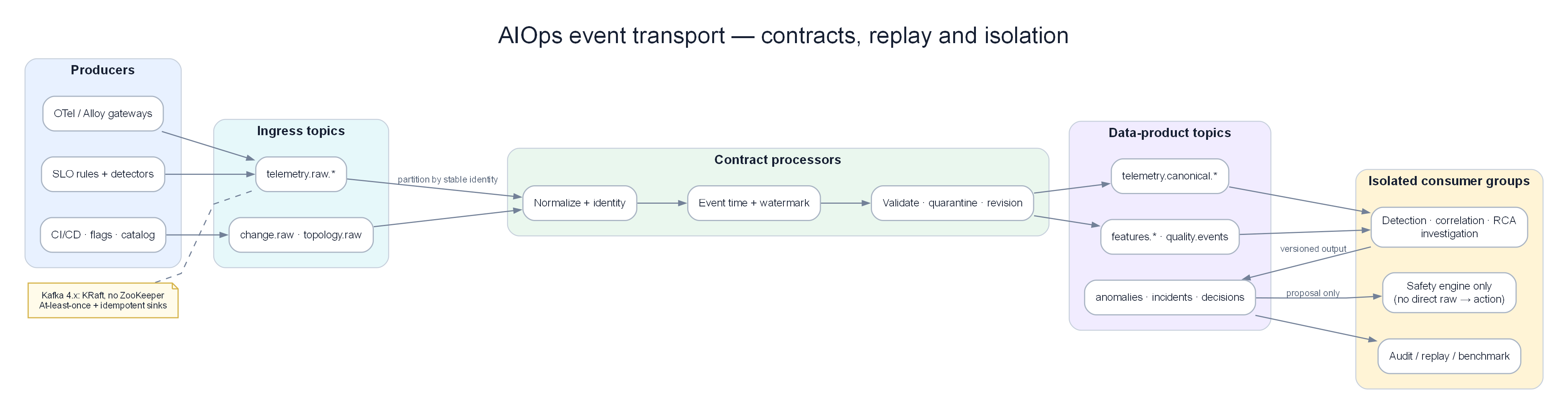
Raw topics → contract processors → versioned data-product topics → isolated consumers; remediation receives typed proposals only.
KEY IDEA
Kafka is not a classical "message queue" (RabbitMQ/SQS). It is a distributed commit log — a journal you can replay. In AIOps this matters more than raw throughput: you need to replay 7 days of telemetry to retrain anomaly detection models, debug false positives, and keep an audit trail. If you treat Kafka as only a fire-and-forget queue, you will misconfigure retention and offsets and lose training data.
Why AIOps requires a transport layer?
An AIOps pipeline has 5–7 stages (collect → detect → correlate → RCA → LLM → remediate). Each stage has different latency and failure modes. Direct HTTP between stages means one slow stage takes down the whole pipeline. Event streaming provides temporal decoupling: the producer is done when it appends to the log; consumers process at their own pace.
The Problem Without a Queue¶
Without a data transport layer, the AIOps pipeline is synchronous and fragile:
graph LR
    AD[Anomaly Detector] -->|direct call| CORR[Correlation Engine]
    CORR -->|direct call| RCA[RCA Engine]
    RCA -->|direct call| LLM[LLM Agent]
    LLM -->|direct call| REM[Remediation]

style AD fill:#dbeafe,color:#1e293bProblems:
- If the Correlation Engine is slow, the Anomaly Detector blocks
- If the LLM Agent crashes, RCA results are lost
- You cannot replay events for debugging or ML retraining
- You cannot add a new consumer (e.g., a second ML model) without changing producers
- Backpressure propagates upstream and risks dropping telemetry
Warning
Edge case: "Direct calls + a small in-process retry queue" looks fine in a POC, but when the OTel Collector drops metrics because AD cannot keep up, you have lost signal — and the ML model later trains on incomplete data, producing false negatives. The transport layer protects data quality, not only latency.
What Kafka Solves¶
graph LR
    AD[Anomaly Detector] -->|publish| K1[(Kafka\nanomalies topic)]
    K1 -->|subscribe| CORR[Correlation Engine]
    K1 -->|subscribe| STORE[Event Store\nfor replay]
    K1 -->|subscribe| TRAIN[ML Training\npipeline]

    CORR -->|publish| K2[(Kafka\ncorrelated-alerts topic)]
    K2 -->|subscribe| RCA[RCA Engine]
    K2 -->|subscribe| GRAFANA[Grafana\nannotations]

    style K1 fill:#f3e8ff,color:#1e293b
style K2 fill:#f3e8ff,color:#1e293bBenefits:
- Decoupling: Producers do not need to know about consumers
- Durability: Messages are durable on disk and survive consumer failures
- Replay: Reprocess historical events for model retraining and debugging
- Fan-out: Multiple consumers can read the same topic
- Backpressure: Consumer lag is visible and monitorable
- Ordering: Strict ordering within a partition
Important
Core trade-off: Kafka adds operational surface (brokers, disk, rebalance, schema). In return you get replay, fan-out, and isolation. For production AIOps (multi-stage + ML training), this trade-off is always worth it — unless scale is tiny (<1K events/s) and the team is <5 people (see §13 Redis Streams).
2. Kafka Architecture Deep Dive¶
KEY IDEA
Think of Kafka as a multi-lane log conveyor belt (partitions). Each lane has its own order. The producer picks a lane via key. A consumer group assigns lanes to workers. There is no "global queue" — only an append-only log per partition. Most production AIOps Kafka bugs come from misunderstanding this model (ordering, rebalance, lag, hot partitions).
graph TD
    subgraph Producers["Producers"]
        P1[OTel Collector\ntelemetry data]
        P2[Anomaly Detector\nanomaly events]
        P3[Alert Correlator\nalert groups]
    end

    subgraph Kafka["Kafka Cluster (3 brokers)"]
        B1[Broker 1\nLeader for partitions: 0,3,6]
        B2[Broker 2\nLeader for partitions: 1,4,7]
        B3[Broker 3\nLeader for partitions: 2,5,8]
        KRAFT[KRaft controller quorum\nmetadata log + elections]
    end

    subgraph Topics["Topics"]
        T1[aiops-metrics\n9 partitions\nRF=3]
        T2[aiops-anomalies\n6 partitions\nRF=3]
        T3[aiops-alerts\n3 partitions\nRF=3]
    end

    subgraph Consumers["Consumer Groups"]
        CG1[anomaly-detector-group\n3 consumer pods]
        CG2[correlation-engine-group\n2 consumer pods]
        CG3[llm-agent-group\n1 consumer pod]
        CG4[event-store-group\n1 consumer pod]
    end

    P1 -->|produce| B1
    P2 -->|produce| B2
    P3 -->|produce| B3

    B1 <-->|replicate| B2
    B2 <-->|replicate| B3

    B1 -->|serve| CG1
    B2 -->|serve| CG2
    B3 -->|serve| CG3

    style Producers fill:#dbeafe,color:#1e293b
    style Kafka fill:#dcfce7,color:#1e293b
    style Topics fill:#f3e8ff,color:#1e293b
    style Consumers fill:#ffedd5,color:#1e293b
Broker Internals¶
Each Kafka broker is responsible for: 1. Serving producer writes for partitions it leads 2. Replicating data to follower brokers 3. Serving consumer reads from its partitions 4. Managing log segments (on-disk files)
Log segment: each partition = a directory of .log + .index + .timeindex. A new segment starts when log.segment.bytes (default 1GB) or log.roll.hours is reached.
Tip
Why care about log segments? Retention/compaction work at segment granularity, not per message. The active segment is not deleted — oversized segment.bytes + 7d retention can keep data longer than expected → silent disk cost growth. For high AIOps throughput, ~1GB/segment is a good balance.
3. Topics and Partitions¶
Partition Key Concepts¶
graph LR
    subgraph Topic["Topic: aiops-metrics"]
        P0[Partition 0\nBroker 1 Leader\nOffset: 0,1,2...1M]
        P1[Partition 1\nBroker 2 Leader\nOffset: 0,1,2...950K]
        P2[Partition 2\nBroker 3 Leader\nOffset: 0,1,2...1.1M]
    end

    MSG1[Message\nkey=service-A] -->|hash key modulo 3 = 0| P0
    MSG2[Message\nkey=service-B] -->|hash key modulo 3 = 1| P1
    MSG3[Message\nkey=service-C] -->|hash key modulo 3 = 2| P2

    CONS1[Consumer 1] -->|reads| P0
    CONS2[Consumer 2] -->|reads| P1
    CONS3[Consumer 3] -->|reads| P2

    style P0 fill:#dbeafe,color:#1e293b
    style P1 fill:#dcfce7,color:#1e293b
    style P2 fill:#f3e8ff,color:#1e293b
Ordering guarantee: Kafka only guarantees order within a partition. Messages with the same key always go to the same partition → per-key ordering.
Why this matters for AIOps:
- Use
service_nameas the message key for anomaly events → all anomalies for a service stay ordered - Use
alert_group_idas the key for alert correlation events → correlated alerts keep order - Do NOT use random or null keys if message order matters
Warning
Edge case — key meaning mismatch: If the correlation engine needs order by service_name but the producer keys by trace_id, anomalies for the same service land on many partitions → the correlator sees out-of-order events → false correlation or missed cascades. Key design is correctness for 10 — Alert Correlation, not only throughput.
Partition Count Design¶
Partition count formula:
Partitions = max(
  desired_throughput / throughput_per_partition,
  number_of_consumers_in_group
)

Example for topic aiops-metrics:
- Target throughput: 100MB/s
- Throughput per partition: ~10MB/s (Kafka benchmark)
- Anomaly detector instances: 6

partitions = max(100/10, 6) = max(10, 6) = 10 partitions

Round up to the next power of 2, or use 12 (multiple of 3 for even distribution):
Result: 12 partitions
Important
Partition count trade-off: More partitions = better consumer scale, but larger metadata, slower rebalance, more open file handles, and increasing partitions breaks key→partition mapping for in-flight data. Start conservative (6–12 for AIOps topics); increase when lag stays high after consumers are maxed out.
Warning: Partition count cannot be decreased after creation. Start safe and increase when needed. Increasing partitions changes the key→partition map and breaks ordering guarantees for in-flight data.
Retention Policy¶
# Time-based retention (default)
kafka-configs.sh --alter \
  --topic aiops-metrics \
  --add-config "retention.ms=604800000"  # 7 days

# Size-based retention (per partition)
kafka-configs.sh --alter \
  --topic aiops-raw-telemetry \
  --add-config "retention.bytes=107374182400"  # 100GB per partition

# Compaction (for changelog/state topics)
kafka-configs.sh --alter \
  --topic aiops-service-registry \
  --add-config "cleanup.policy=compact"
Retention policy trade-offs:
| Policy | Benefit | Cost |
|---|---|---|
| Short (1-24h) | Low storage cost | Cannot replay historical data |
| Long (7-30d) | Full replay capability | High storage cost |
| Compacted | Unbounded retention (latest value per key only) | No time-range queries |
AIOps recommendation: 7-day retention for telemetry topics (replay window for model retraining). 30 days for alert/incident topics (post-incident analysis).
Tip
Why 7 days raw, 30 days anomalies? Raw telemetry volume is large (metrics/logs/traces) — 7 days is enough for common feature windows (1–7 days) in 09 — Anomaly Detection. Anomaly/alert volume is ~100–1000× smaller → 30 days is cheap and supports post-incident and audit. Incident topics: compact + long retention.
4. Producers — Configuration and Guarantees¶
KEY IDEA
Producer config is not first about "performance tuning" — it is about choosing the failure mode you accept. acks=0 = accept lost events. acks=all + min.insync.replicas=2 = accept rejected writes when the cluster is degraded. AIOps should reject writes rather than silently lose anomalies — lost anomalies are blind spots; rejects mean clear producer buffer/retry/alert behavior.
Delivery Semantics¶
| Config | Guarantee | Behavior |
|---|---|---|
acks=0 |
Fire-and-forget | Producer does not wait for ack. Fastest. May lose messages. |
acks=1 |
Leader ack | Leader writes to log and acks. Followers may not have replicated yet. Risk: leader crashes before replication completes. |
acks=-1 (all) |
Full replication | All in-sync replicas must ack. Slowest. No data loss if min.insync.replicas=2. |
For AIOps (important events): Always use acks=-1.
Exactly-Once Semantics (EOS)¶
Problem: Producer retries can duplicate messages: 1. Producer sends a message 2. Broker writes the message and sends ack 3. Network fails — producer does not receive ack 4. Producer retries → duplicate message
Solution: Idempotent producer + transactions
# Producer config for EOS
producer_config = {
    "bootstrap.servers": "kafka-1:9092,kafka-2:9092,kafka-3:9092",

    # Idempotent producer: enables dedup on retry
    "enable.idempotence": True,

    # Required for idempotent config:
    "acks": "all",
    "retries": 2147483647,            # Max retries
    "max.in.flight.requests.per.connection": 5,  # Must be ≤5 for idempotent

    # Transactional ID (for exactly-once consume-produce)
    "transactional.id": "aiops-anomaly-detector-0",  # Unique per producer instance

    # Performance tuning
    "batch.size": 65536,              # 64KB batches
    "linger.ms": 10,                  # Wait up to 10ms to fill a batch
    "compression.type": "snappy",     # Compress batches
    "buffer.memory": 33554432,        # 32MB producer buffer
}

from confluent_kafka import Producer
producer = Producer(producer_config)

# Initialize transaction
producer.init_transactions()
producer.begin_transaction()

try:
    # Produce within a transaction
    producer.produce(
        topic="aiops-anomalies",
        key=b"service-order",
        value=json.dumps(anomaly_event).encode(),
        headers={"content-type": b"application/json"},
    )
    producer.commit_transaction()
except Exception as e:
    producer.abort_transaction()
    raise
Warning
Myth about to break: Kafka EOS does not make the entire AIOps pipeline exactly-once end-to-end. EOS only covers Kafka read → process → Kafka write inside a transactional boundary. Side effects (Prometheus API, Redis, LLM, PagerDuty) remain at-least-once. See §21 Exactly-Once Myths.
Producer Compression¶
| Codec | Compression ratio | CPU cost | Best for |
|---|---|---|---|
| None | 1:1 | No CPU | Very small messages |
| gzip | 4:1 | High | CPU-rich producers, high compression need |
| snappy | 2:1 | Low | Production default |
| lz4 | 2:1 | Very low | Ultra-low latency |
| zstd | 4:1 | Medium | Best ratio/speed balance |
Recommendation: Use zstd for AIOps telemetry topics (high ratio, medium CPU). Use snappy for alert events (latency matters more than compression ratio).
Tip
Why compression matters for cost? Disk retention = raw_bytes × compression_ratio × RF. Switching snappy→zstd on telemetry can cut 30–50% storage → 7-day retention becomes clearly cheaper (see §19 Cost Model).
5. Consumers and Consumer Groups¶
KEY IDEA
A consumer group is one logical subscriber. Same group.id = share partitions (compete). Different group.id = each group gets a full copy (fan-out). This is the foundation of multi-consumer AIOps: AD, correlation, audit, and training must not share a group — they are independent groups on the same topic.
Consumer Group Mechanics¶
sequenceDiagram
    participant C1 as Consumer 1 (pod)
    participant C2 as Consumer 2 (pod)
    participant C3 as Consumer 3 (pod)
    participant GC as Group Coordinator (Broker)
    participant P0 as Partition 0
    participant P1 as Partition 1
    participant P2 as Partition 2

    C1->>GC: JoinGroup(group_id="anomaly-detector")
    C2->>GC: JoinGroup(group_id="anomaly-detector")
    C3->>GC: JoinGroup(group_id="anomaly-detector")

    GC->>C1: Assign partition 0 (elected leader)
    GC->>C2: Assign partition 1
    GC->>C3: Assign partition 2

    loop Every max.poll.interval.ms
        C1->>P0: Fetch records (max.poll.records=500)
        C2->>P1: Fetch records
        C3->>P2: Fetch records
        C1->>GC: Commit offset 1234
        C2->>GC: Commit offset 5678
    end

    Note over C2: Pod crashes
    C2->>GC: LeaveGroup (or timeout after session.timeout.ms)
    GC->>C1: Rebalance: also receives partition 1
    GC->>C3: Keeps partition 2
Consumer Configuration¶
consumer_config = {
    "bootstrap.servers": "kafka-1:9092,kafka-2:9092,kafka-3:9092",
    "group.id": "anomaly-detector-group",

    # Start from latest if no committed offset
    "auto.offset.reset": "latest",     # or "earliest" for replay

    # Disable auto commit! Commit manually after processing
    "enable.auto.commit": False,

    # Heartbeat frequency to the broker
    "heartbeat.interval.ms": 3000,

    # Max time between poll() calls before the consumer is considered dead
    # Must be larger than the processing time of one batch
    "max.poll.interval.ms": 300000,    # 5 minutes

    # Max records returned per poll()
    "max.poll.records": 500,

    # Minimum data to receive (wait until this much data before returning)
    "fetch.min.bytes": 1024,

    # Max wait if fetch.min.bytes is not satisfied
    "fetch.max.wait.ms": 500,

    # Security
    "security.protocol": "SASL_SSL",
    "sasl.mechanism": "SCRAM-SHA-512",
    "sasl.username": "aiops-consumer",
    "sasl.password": "${KAFKA_PASSWORD}",
    "ssl.ca.location": "/certs/kafka-ca.crt",
}

from confluent_kafka import Consumer, KafkaError
import json

consumer = Consumer(consumer_config)
consumer.subscribe(["aiops-metrics"])

try:
    while True:
        msgs = consumer.poll(timeout=1.0)  # Wait up to 1s for messages

        if msgs is None:
            continue
        if msgs.error():
            if msgs.error().code() == KafkaError._PARTITION_EOF:
                continue  # Reached end of partition
            raise KafkaError(msgs.error())

        # Process message
        try:
            event = json.loads(msgs.value())
            process_anomaly(event)

            # Manual commit AFTER successful processing (at-least-once)
            consumer.commit(asynchronous=False)

        except Exception as e:
            # Send to DLQ if processing fails
            send_to_dlq(msgs, str(e))
            consumer.commit(asynchronous=False)  # Still commit to continue to next messages

finally:
    consumer.close()
Important
Why enable.auto.commit=False? Auto-commit commits on a timer, not on "processing finished". Crash between process and commit → reprocess (OK if idempotent). Crash after auto-commit but before process finishes → lost event (at-most-once). AIOps cannot accept lost anomalies. Manual commit after process = at-least-once.
Tip
Edge case max.poll.interval.ms: If batch ML inference (Isolation Forest on 500 metrics) takes longer than max.poll.interval.ms, the consumer is kicked from the group → rebalance storm → lag grows → worse. Lower max.poll.records or raise the interval; better: separate fetch thread from process thread.
Consumer Lag — Core Health Metric¶
Consumer Lag = Latest Offset - Committed Consumer Offset

High lag (>10K messages) signals:
- Consumer is slow → processing rate too low
- This is the earliest warning of an AIOps pipeline bottleneck
Note
Lag is not always an incident. Cyclic deploy lag, overnight lag when retrain jobs run, short lag after rebalance — can be a normal signal. Unbounded linear lag growth, lag on the critical path (anomalies → correlation) — is an incident. Details: §20 Mental Model.
6. Offset Management¶
KEY IDEA
An offset is a read bookmark, not "every side-effect completed successfully". Committing an offset only says: "I will not re-read this message (unless I seek)". Side effects (DB, LLM, tickets) must be idempotent on their own. That is why AIOps consumers are designed as at-least-once + idempotent keys (event_id).
Offset Commit Strategies¶
| Strategy | Implementation | Risk | Use case |
|---|---|---|---|
| Auto-commit | enable.auto.commit=True |
May commit before processing finishes → at-most-once | Simple consumers, log forwarding |
| Manual sync commit | commit(async=False) |
Slowest; blocks until ack | Recommended for critical AIOps |
| Manual async commit | commit(async=True) |
Small risk (silent commit failure) | Idempotent processing, high throughput |
| Transactional | Producer + Consumer in one transaction | Complex | Exactly-once style stream processing |
Seek and Replay¶
# Replay from the beginning (for model retraining)
from confluent_kafka import TopicPartition

partitions = consumer.assignment()
consumer.seek_to_beginning(partitions)

# Replay from a specific timestamp (post-incident: last 2 hours)
import time
ts = int((time.time() - 7200) * 1000)  # 2 hours ago in milliseconds

for partition in partitions:
    offsets = consumer.offsets_for_times(
        [TopicPartition(partition.topic, partition.partition, ts)]
    )
    consumer.seek(offsets[0])
Tip
Why replay is an AIOps superpower? After an incident, seek back 2 hours on aiops-anomalies with consumer group postmortem-replay-YYYYMMDD (new group → does not touch production offsets). Retrain the model, verify the correlator, debug false positives — no need to dump S3 first if retention still holds data. That is why 7–30 day retention is not "wasted disk".
Warning
Edge case: auto.offset.reset=latest on a new consumer group skips the backlog. A new group for blue-green deploy with reset=latest → lose anomalies in the deploy window. Production AIOps: new groups use earliest or explicit seek to deploy-minus-buffer timestamp.
7. Replication and Durability¶
KEY IDEA
Kafka replication is anti-data-loss, not read load balancing (consumers read from the leader by default). RF=3 + min.ISR=2 + unclean.leader.election=false means you choose consistency over availability when the cluster is damaged. Correct for alert/incident topics; may be relaxed for debug topics.
Replication Factor¶
Replication Factor (RF) = number of copies of each partition stored

RF=1: No redundancy. Broker dies = data loss.
RF=2: Survives 1 broker failure. Risk of split-brain.
RF=3: Survives 1 broker failure. Recommended for production.
RF=5: Survives 2 broker failures. Very expensive.
AIOps recommendation: Set RF=3 for all topics.
Min In-Sync Replicas (min.insync.replicas)¶
Producer acks=all + min.insync.replicas=2

Meaning:
- Leader + at least 1 follower must acknowledge the write
- If only 1 broker is up (the leader), writes fail with NotEnoughReplicas
- Prevents data loss by trading availability
# Create topic with production durability settings
kafka-topics.sh --create \
  --topic aiops-anomalies \
  --partitions 6 \
  --replication-factor 3 \
  --config min.insync.replicas=2 \
  --config unclean.leader.election.enable=false \
  --config retention.ms=604800000
Unclean Leader Election¶
unclean.leader.election.enable=false (critical for AIOps):
If all in-sync replicas fail, Kafka must choose:
- true: Elect an out-of-sync replica as leader → prioritize availability, risk data loss
- false: Wait for an in-sync replica to return → prioritize consistency, accept temporary unavailability
For AIOps alert/incident data: always use false. Data loss in the AIOps pipeline is worse than temporary service interruption.
Important
Availability trade-off: With unclean.leader.election=false and ISR shrinks to 0, the topic stops serving that partition. AIOps is temporarily "blind" on that partition — but does not self-heal with wrong data. Combine with §25 Bypass design: Alertmanager → PagerDuty still works when Kafka is down.
8. Kafka Topic Design for AIOps¶
KEY IDEA
Topic topology reflects pipeline stages, not "everything that can stream". Each topic hop is a contract boundary (schema + latency SLA + retention + owners). Too many topics = operational chaos. Too few topics = large blast radius when schema/lag/poison messages hit.
Topic Topology¶
graph TD
    subgraph Raw["Raw Telemetry"]
        T1[aiops-raw-metrics\n12 partitions, 7d retention]
        T2[aiops-raw-logs\n12 partitions, 7d retention]
        T3[aiops-raw-traces\n12 partitions, 7d retention]
    end

    subgraph Processed["Processed Events"]
        T4[aiops-anomalies\n6 partitions, 30d retention]
        T5[aiops-correlated-alerts\n3 partitions, 30d retention]
        T6[aiops-rca-results\n3 partitions, 30d retention]
    end

    subgraph Action["Action Events"]
        T7[aiops-remediation-triggers\n3 partitions, 90d retention]
        T8[aiops-remediation-results\n3 partitions, 90d retention]
        T9[aiops-incidents\n3 partitions, 1y retention, compacted]
    end

    subgraph DLQ["Dead Letter Queues"]
        DLQ1[aiops-anomalies-dlq\n3 partitions, 7d]
        DLQ2[aiops-remediation-dlq\n3 partitions, 7d]
    end

    T1 -->|anomaly detector| T4
    T2 -->|log anomaly detector| T4
    T3 -->|trace anomaly detector| T4
    T4 -->|correlation engine| T5
    T5 -->|RCA engine| T6
    T6 -->|LLM agent| T7
    T7 -->|remediation executor| T8
    T7 -->|on failure| DLQ2

    style Raw fill:#dbeafe,color:#1e293b
    style Processed fill:#dcfce7,color:#1e293b
    style Action fill:#ffedd5,color:#1e293b
    style DLQ fill:#fecaca,color:#1e293b
Topic Naming Convention¶
<domain>-<data-type>-<qualifier>

Examples:
aiops-raw-metrics          # Raw telemetry: metrics
aiops-raw-logs             # Raw telemetry: logs
aiops-anomalies            # Processed: anomaly events
aiops-anomalies-dlq        # Dead letter: failed anomaly processing
aiops-correlated-alerts    # Processed: correlated alert groups
aiops-rca-results          # Processed: root cause analysis results
aiops-remediation-triggers # Actions: remediation trigger commands
aiops-remediation-results  # Actions: remediation execution results
aiops-incidents            # State: incident registry (compacted)
Tip
Why separate raw vs processed? Retention/cost differ; ACLs differ (raw = collector write; processed = AD write); poison messages on raw should not block the remediation topic. Blast-radius isolation beats "one convenient topic for everything".
9. Message Schema and Serialization¶
KEY IDEA
Schema is the API contract between teams (platform telemetry, AD, correlation, remediation). Breaking schema = silent failure or mass poison messages → broken model training, correlator crash loops. Schema Registry is not a "nice to have" — it is a safety rail for multi-service AIOps.
Schema Registry¶
Use Confluent Schema Registry to enforce message schemas:
# Schema Registry deployment
apiVersion: apps/v1
kind: Deployment
metadata:
  name: schema-registry
  namespace: kafka
spec:
  replicas: 2
  template:
    spec:
      containers:
        - name: schema-registry
          image: confluentinc/cp-schema-registry:7.5.0
          env:
            - name: SCHEMA_REGISTRY_KAFKASTORE_BOOTSTRAP_SERVERS
              value: "kafka-1:9092,kafka-2:9092,kafka-3:9092"
            - name: SCHEMA_REGISTRY_HOST_NAME
              value: schema-registry
            - name: SCHEMA_REGISTRY_LISTENERS
              value: http://0.0.0.0:8081
Anomaly Event Schema (Avro)¶
{
  "type": "record",
  "name": "AnomalyEvent",
  "namespace": "com.aiops.events",
  "fields": [
    {"name": "event_id", "type": "string", "doc": "UUID v4"},
    {"name": "timestamp", "type": "long", "logicalType": "timestamp-millis"},
    {"name": "service_name", "type": "string"},
    {"name": "service_namespace", "type": "string"},
    {"name": "cluster", "type": "string"},
    {"name": "signal_type", "type": {"type": "enum", "name": "SignalType",
      "symbols": ["METRIC", "LOG", "TRACE"]}},
    {"name": "metric_name", "type": ["null", "string"], "default": null},
    {"name": "anomaly_score", "type": "double", "doc": "0.0-1.0, higher=more anomalous"},
    {"name": "anomaly_type", "type": "string", "doc": "spike|drop|seasonal|pattern"},
    {"name": "algorithm", "type": "string", "doc": "ewma|zscore|isolation_forest|lstm"},
    {"name": "baseline_value", "type": ["null", "double"], "default": null},
    {"name": "current_value", "type": ["null", "double"], "default": null},
    {"name": "deviation_pct", "type": ["null", "double"], "default": null},
    {"name": "confidence", "type": "double", "doc": "0.0-1.0 model confidence"},
    {"name": "context", "type": {
      "type": "map",
      "values": "string"
    }, "doc": "Additional key-value attributes"},
    {"name": "related_trace_ids", "type": {"type": "array", "items": "string"}, "default": []},
    {"name": "raw_data_ref", "type": ["null", "string"], "default": null,
      "doc": "Reference to raw data in object storage"}
  ]
}
Serialization Options¶
| Format | Schema evolution | Size | Speed | Use case |
|---|---|---|---|---|
| Avro + Schema Registry | ✅ Excellent (backward/forward compatible) | Small (binary) | Fast | AIOps production (recommended) |
| Protobuf | ✅ Excellent | Smallest | Fastest | High throughput, strict schema |
| JSON | ❌ No support (easy breaking changes) | Largest | Slowest | Development, debug |
| Parquet | N/A (file format, not for streaming) | Smallest | — | Batch/offline processing |
Warning
Schema evolution breaks training: Adding a required field without default; changing anomaly_score type float→string; renaming service_name→service — old consumers fail, DLQ fills, or worse: silent coercion of wrong values → training set gets dirty labels. Always use BACKWARD compatibility + default values. Details §22.
10. Dead Letter Queue Pattern¶
KEY IDEA
DLQ is a safety valve: poison messages must not block a partition forever (head-of-line blocking). Commit + send to DLQ = keep moving; no commit + infinite retry on a bad message = unbounded lag on one partition. AIOps needs both: DLQ for bad data, and alerts when DLQ rate rises (schema bug / dependency down signal).
When a message cannot be processed (parse error, downstream error, timeout), it must go to an error queue — never be silently dropped.
graph LR
    KAFKA[Kafka Topic\naiops-anomalies] --> CONS[Consumer\nAnomaly Processor]
    CONS -->|success| NEXT[Next Topic\naiops-correlated-alerts]
    CONS -->|failure| DLQ[Dead Letter Queue\naiops-anomalies-dlq]
    DLQ -->|manual review| OPS[Operations Team]
    DLQ -->|retry logic| RETRY[DLQ Processor\nretry with backoff]
    RETRY -->|reprocess| CONS

    style DLQ fill:#fecaca,color:#1e293b
def process_with_dlq(consumer, producer, dlq_topic):
msg = consumer.poll(1.0)
if msg is None:
return
try:
event = AnomalyEvent.from_bytes(msg.value())
process_anomaly(event)
consumer.commit(asynchronous=False)
except (ValueError, KeyError) as e:
# Parse/schema error — send to DLQ immediately (no retry)
send_to_dlq(
producer=producer,
dlq_topic=dlq_topic,
original_msg=msg,
error=str(e),
error_type="PARSE_ERROR",
retry_count=0,
)
consumer.commit(asynchronous=False)
except TemporaryError as e:
# Transient error — check retry count
retry_count = int(msg.headers().get("retry_count", [b"0"])[1])
if retry_count >= 3:
# Exceeded retries → send to DLQ
send_to_dlq(producer, dlq_topic, msg, str(e), "MAX_RETRIES", retry_count)
consumer.commit(asynchronous=False)
else:
# Re-produce to topic with incremented retry count and backoff delay
time.sleep(2 ** retry_count) # Exponential backoff: 1s, 2s, 4s
producer.produce(
topic=msg.topic(),
key=msg.key(),
value=msg.value(),
headers=[
("retry_count", str(retry_count + 1).encode()),
("original_timestamp", msg.timestamp()[1].to_bytes(8, 'big')),
("error_message", str(e).encode()[:1024]),
],
)
consumer.commit(asynchronous=False)
def send_to_dlq(producer, dlq_topic, original_msg, error, error_type, retry_count):
dlq_payload = {
"original_topic": original_msg.topic(),
"original_partition": original_msg.partition(),
"original_offset": original_msg.offset(),
"original_key": original_msg.key().decode() if original_msg.key() else None,
"original_value_b64": base64.b64encode(original_msg.value()).decode(),
"error_message": error,
"error_type": error_type,
"retry_count": retry_count,
"failed_at": datetime.utcnow().isoformat(),
}
producer.produce(
topic=dlq_topic,
value=json.dumps(dlq_payload).encode(),
)
producer.flush()
Important
Classify errors before DLQ: PARSE_ERROR / schema → DLQ immediately, no retry. TemporaryError (Redis timeout, downstream 503) → bounded retry. Business validation (score NaN) → DLQ + metric. Funneling everything into one except Exception = swallowing bugs and polluting the DLQ, hiding root cause.
11. AWS MSK — Managed Kafka¶
KEY IDEA
MSK buys operational time, not "better Kafka". Brokers are still Kafka. You still design topics, schemas, lag alerts, and ACLs. What AWS owns: OS patching, broker replace, multi-AZ wiring, storage attach. For a small AIOps team, that is usually the right trade-off.
Amazon MSK (Managed Streaming for Apache Kafka) reduces Kafka operational burden.
MSK vs Self-Hosted Kafka¶
| Dimension | AWS MSK | Self-Hosted |
|---|---|---|
| Setup / ops | 30 minutes; AWS patches broker/OS | 2–5 days setup; high ops |
| Version / KRaft | AWS catalog; Serverless KRaft | Pin freely; KRaft 3.4+ |
| Multi-AZ / VPC | Automatic + native VPC | Design yourself |
| Monitoring | CloudWatch + JMX/Prometheus | Full Prometheus you build |
| Cost (3-broker mid) | ~$400–750/month | Cheaper EC2 + eng hours |
| Connect / Serverless | MSK Connect; Serverless ✅ | Self-manage; Serverless ❌ |
Recommendation: small/mid team → MSK; large team + Kafka experts → self-hosted; burst load → MSK Serverless.
Tip
Regulated industries (finance/healthcare/gov): see also §26 MSK vs Self-Managed for Regulated Industries — the decision is not only TCO but also audit, data residency, and change control.
MSK Terraform¶
resource "aws_msk_cluster" "aiops" {
  cluster_name           = "aiops-kafka-prod"
  kafka_version          = "3.5.1"
  number_of_broker_nodes = 3    # 1 broker per AZ in us-east-1

  broker_node_group_info {
    instance_type   = "kafka.m5.large"    # 2 vCPU, 8GB RAM
    client_subnets  = [
      aws_subnet.private_us_east_1a.id,
      aws_subnet.private_us_east_1b.id,
      aws_subnet.private_us_east_1c.id,
    ]
    storage_info {
      ebs_storage_info {
        volume_size = 1000    # 1TB per broker
        provisioned_throughput {
          enabled           = true
          volume_throughput = 250    # MB/s
        }
      }
    }
    security_groups = [aws_security_group.kafka.id]
  }

  encryption_info {
    encryption_in_transit {
      client_broker = "TLS"           # TLS required
      in_cluster    = true
    }
    encryption_at_rest {
      data_volume_kms_key_id = aws_kms_key.kafka.arn
    }
  }

  client_authentication {
    sasl {
      scram = true    # SASL/SCRAM with AWS Secrets Manager
      iam   = true    # IAM auth (MSK native)
    }
  }

  configuration_info {
    arn      = aws_msk_configuration.aiops.arn
    revision = aws_msk_configuration.aiops.latest_revision
  }

  enhanced_monitoring = "PER_TOPIC_PER_PARTITION"  # Detailed CloudWatch metrics

  open_monitoring {
    prometheus {
      jmx_exporter {
        enabled_in_broker = true    # Export JMX metrics for Prometheus
      }
    }
  }

  logging_config {
    broker_logs {
      cloudwatch_logs {
        enabled   = true
        log_group = aws_cloudwatch_log_group.msk_broker.name
      }
      s3 {
        enabled = true
        bucket  = aws_s3_bucket.msk_logs.id
        prefix  = "kafka-broker-logs/"
      }
    }
  }

  tags = {
    Environment = "production"
    Component   = "aiops-transport"
  }
}

resource "aws_msk_configuration" "aiops" {
  kafka_versions = ["3.5.1"]
  name           = "aiops-kafka-config"

  server_properties = <<-EOF
    auto.create.topics.enable=false
    default.replication.factor=3
    min.insync.replicas=2
    num.partitions=12
    num.network.threads=8
    num.io.threads=16
    socket.send.buffer.bytes=102400
    socket.receive.buffer.bytes=102400
    socket.request.max.bytes=104857600
    log.retention.hours=168
    log.segment.bytes=1073741824
    log.retention.check.interval.ms=300000
    unclean.leader.election.enable=false
    replica.lag.time.max.ms=30000
    offsets.retention.minutes=10080
    transaction.state.log.replication.factor=3
    transaction.state.log.min.isr=2
    EOF
}
Warning
auto.create.topics.enable=false is mandatory in production. Randomly created topics with default partitions/RF/retention are a cost bomb and a correctness bomb. Every AIOps topic must be provisioned via Terraform/GitOps with explicit RF, ISR, and retention.
12. Kafka vs Kinesis¶
| Dimension | Apache Kafka (MSK) | AWS Kinesis |
|---|---|---|
| Throughput / unit | ~10MB/s per partition | 1MB/s write, 2MB/s read per shard |
| Retention / replay | Flexible config; offset replay | 1–365 days; timestamp replay |
| Consumer fan-out | Full consumer groups | Enhanced Fan-Out |
| Ordering | Per partition | Per shard |
| Message size | 1MB default (configurable) | 1MB hard limit |
| Exactly-once | Transactions ✅ | At-least-once |
| Ecosystem | Connect, Streams, Flink | Lambda, Firehose, S3-native |
| Small-scale cost | Higher (fixed brokers) | Clearly cheaper at small scale |
Decision matrix:
Heavy AWS Lambda usage?              → Kinesis (natural triggers)
Need exactly-once semantics?         → Kafka
Message size >1MB?                   → Kafka
Long retention (>365 days)?          → Kafka
Small team, AWS-only?                → Kinesis (simpler)
Need rich ecosystem (Flink...)?      → Kafka
Cost first (<100MB/s)?               → Kinesis cheaper at small scale
Cost at large scale (>1GB/s)?        → Kafka cheaper (MSK fixed cost amortizes better)
Tip
For hybrid AIOps: Many teams use Kinesis for edge/Lambda raw ingestion, sink to S3, and Kafka/MSK for control-plane events (anomalies, correlated alerts, remediation) where multi-consumer + ordering + schema matter more. One size does not have to fit all.
13. Kafka vs Redis Streams¶
Redis Streams is a lighter alternative for small-scale AIOps systems.
| Dimension | Kafka | Redis Streams |
|---|---|---|
| Throughput / durability | Millions msg/s; disk-durable | 100–500K/s; memory (+AOF/RDB) |
| Retention / replay | Days→years; full offset | RAM-limited; limited replay |
| Partitioning | First-class | No native multi-partition |
| Ops / cost / ecosystem | High / high / very large | Low / low / small |
Recommendation:
- Scale <10K events/s AND team <10 engineers: Redis Streams (simpler)
- Scale >10K events/s OR need full replay: Kafka/MSK
- Mid/large production AIOps: Kafka/MSK (ecosystem + durability)
Warning
Redis Streams + AOF still does not replace Kafka for 7-day full replay training. Memory cost scales linearly with retention. Use Redis Streams for short-lived internal command buses; do not train Isolation Forest from a 30-day Redis stream.
14. Processing on Kafka — Flink, Kafka Streams, and Consumer Services¶
KEY IDEA
Kafka stores and fans out events. Processing (normalize heavy maps, topology join, feature windows, sessionization) happens in consumers of the log. In industry, Kafka + Apache Flink is the most common heavy pairing — Flink’s Kafka connector, event-time model, and checkpointed state match multi-stage AIOps data planes. That does not mean every AIOps deployment must run Flink on day one.
14.1 Why “Kafka goes with Flink” is usually true (at scale)¶
| Fact | Implication |
|---|---|
| Flink treats Kafka as a durable, replayable source of truth | Recompute features / fix a bad enrich job from offsets + savepoints |
| AIOps needs event-time (scrape delay, batch export, region lag) | Watermarks > naive now() windows in a Python loop |
| Enrichment joins are stateful (service → owner, deploy version) | RocksDB keyed state beats ad-hoc Redis maps without recovery story |
| Multiple sinks (canonical topic, online features, lake) | One Flink job graph can fan out with consistent processing time |
Managed options (Amazon Managed Service for Apache Flink, Confluent, Ververica, etc.) reduce ops — the mental model stays the same: log on Kafka, state + windows on Flink.
14.2 When Kafka does not need Flink¶
| Workload | Prefer | Why |
|---|---|---|
| Rename, drop, sample, unit convert | OTel Collector | Cheaper, edge-local, no cluster |
| Model score, simple threshold AD | Consumer service (group.id per model) |
Language of the model; lower ops |
| Light JVM enrich / route | Kafka Streams | No Flink JM/TM; deploy with the service |
| Nightly training tables / backfill | Spark / warehouse | Throughput & SQL over sub-second latency |
| Team < ~5 eng, <10K events/s | Stay simple | Flink platform tax dominates value |
Deep comparison (pros/cons, maturity ladder): 06 — Data plane §5.6.
14.3 Reference topology¶
Producers (Collector, Alertmanager, CD webhooks)
    → Kafka topics (raw / canonical / change)
        → Flink (or Streams): enrich + feature windows
            → Kafka topics (features, enriched events)
                → Consumer groups: AD · correlation · RCA · audit
        → Spark / ELT: cold path training (optional, from Kafka or S3)
14.4 Contract rules (whatever engine you pick)¶
- Schemas live on topics, not inside Flink job code only — Schema Registry + version.
- Each processor class gets a stable
group.id(or Flink UID) — never share with AD scorers. - Lag is a product signal: Flink checkpoint/commit lag high → features stale → suppress or degrade AD (§20 — Backpressure & lag).
- Prefer at-least-once + idempotent sinks for AIOps features unless you truly need Kafka transactions end-to-end.
- Fail open on enrich: missing topology →
unknown+ quality flag, do not block the bus.
Tip
One-line rule: Use Kafka always for multi-consumer AIOps transport. Add Flink when you outgrow “stateless consumers + Redis.” Do not add Flink to feel enterprise.
15. Production Configuration¶
KEY IDEA
Broker defaults are safe for demos, not for AIOps. The three most important lines: auto.create.topics.enable=false, unclean.leader.election.enable=false, min.insync.replicas=2. Everything else is tuning.
Kafka Broker Configuration¶
# server.properties (production environment)

# Network
num.network.threads=8
num.io.threads=16
socket.send.buffer.bytes=102400
socket.receive.buffer.bytes=102400
socket.request.max.bytes=104857600    # 100MB limit

# Log storage
log.dirs=/data/kafka/logs
num.recovery.threads.per.data.dir=4
log.retention.hours=168               # 7 days
log.segment.bytes=1073741824          # 1GB segments
log.retention.check.interval.ms=300000

# Replication
default.replication.factor=3
min.insync.replicas=2
unclean.leader.election.enable=false
replica.lag.time.max.ms=30000

# Performance
num.partitions=12
message.max.bytes=1048576             # 1MB max message size
replica.fetch.max.bytes=1048576
compression.type=producer             # Honor producer compression

# Transactions
transaction.state.log.replication.factor=3
transaction.state.log.min.isr=2
transaction.max.timeout.ms=900000     # 15 minute max transaction

# JVM heap (outside broker config, set in kafka-server-start.sh)
# KAFKA_HEAP_OPTS="-Xmx6g -Xms6g"
Tip
Heap sizing: Kafka uses OS page cache more than JVM heap. Do not set heap = 90% of RAM. Rule of thumb: 4–6GB heap for a mid-size broker, leave the rest for page cache. Monitor UnderReplicatedPartitions when disk IO saturates — usually storage throughput, not heap.
16. Monitoring Kafka¶
KEY IDEA
Monitoring Kafka for AIOps = monitoring pipeline health, not only "broker up". Metric #1 is consumer lag by group × topic on the critical path. Broker disk at 70% matters, but correlation-engine lag of 200K messages at 3AM is what pages PagerDuty.
Key Metrics (via JMX Exporter)¶
# Consumer lag (most important metric)
kafka_consumer_group_lag_sum{group="anomaly-detector-group"}

# Alert when lag exceeds threshold
- alert: KafkaConsumerLagHigh
  expr: |
    kafka_consumer_group_lag_sum > 10000
  for: 5m
  labels:
    severity: warning
  annotations:
    summary: "Consumer group {{ $labels.group }} lag: {{ $value }} messages"

# Producer throughput
rate(kafka_server_brokertopicmetrics_messagesinpersec[5m])

# Broker health
kafka_server_replicamanager_underreplicatedpartitions  # Expected: 0
kafka_server_replicamanager_offlinereplicacount        # Expected: 0
kafka_controller_kafkacontroller_activecontrollercount # Expected: 1

# Network congestion
kafka_network_requestchannel_requestqueue_size         # Pending request queue size
kafka_network_processor_idlepercent                    # Expected >30%

# Log segments
kafka_log_log_numlogsegments                           # Current segment count
kafka_log_log_logstartoffset                           # Oldest available offset
kafka_log_log_logendoffset                             # Latest offset
Critical Alerts¶
- alert: KafkaUnderReplicatedPartitions
  expr: kafka_server_replicamanager_underreplicatedpartitions > 0
  for: 10m
  labels:
    severity: critical
  annotations:
    summary: "Kafka has {{ $value }} under-replicated partitions"

- alert: KafkaBrokerDown
  expr: up{job="kafka"} == 0
  for: 2m
  labels:
    severity: critical

- alert: KafkaConsumerGroupLagCritical
  expr: |
    sum by (group, topic) (kafka_consumer_group_lag_sum) > 100000
  for: 10m
  labels:
    severity: critical
  annotations:
    summary: "Consumer group {{ $labels.group }} has critical lag on {{ $labels.topic }}"

- alert: KafkaAIOpsDLQRateHigh
  expr: |
    rate(aiops_dlq_messages_total[5m]) > 1
  for: 10m
  labels:
    severity: warning
  annotations:
    summary: "DLQ receiving poison/failed messages — check schema or downstream"

- alert: KafkaDiskUsageHigh
  expr: |
    (1 - node_filesystem_avail_bytes{mountpoint="/data"}
      / node_filesystem_size_bytes{mountpoint="/data"}) > 0.75
  for: 15m
  labels:
    severity: warning
Grafana Dashboard for Kafka¶
Key panels to include: 1. Consumer lag by group and topic (time series) 2. Producer throughput (MB/s) by topic 3. Disk usage per broker 4. Under-replicated partitions (must stay at 0) 5. Network bytes in/out per broker 6. P99 request processing time (produce + fetch) 7. DLQ rate by error_type (parse vs temporary vs max_retries) 8. Partition size skew (hot partition detection)
Important
Lag alerts must be multi-tier and multi-group: warning 10K/5m, critical 100K/10m — and severity split by path. Lag on aiops-raw-metrics/anomaly-detector-group = detection delay. Lag on aiops-remediation-triggers = action delay (more severe if auto-remediation is on). One shared threshold for every group is an anti-pattern.
17. Scaling¶
Horizontal Scaling¶
Adding brokers: Kafka supports adding brokers via kafka-reassign-partitions.sh. Partition reassignment must be run explicitly to rebalance load.
# Generate partition reassignment plan
kafka-reassign-partitions.sh \
  --bootstrap-server kafka-1:9092 \
  --topics-to-move-json-file topics.json \
  --broker-list "1,2,3,4" \
  --generate

# Execute reassignment
kafka-reassign-partitions.sh \
  --bootstrap-server kafka-1:9092 \
  --reassignment-json-file reassignment.json \
  --execute

# Verify results
kafka-reassign-partitions.sh \
  --bootstrap-server kafka-1:9092 \
  --reassignment-json-file reassignment.json \
  --verify
Scaling consumers: Add more consumer instances to the same consumer group. The system automatically rebalances partitions. Max consumers = number of topic partitions.
Increasing partition count: Increase if consumer processing is the bottleneck (and you need more consumers). Decreasing partition count is not supported.
Tip
Why throttle reassignment? Moving partitions = disk + network copy. Full-speed moves during peak hours can raise produce p99 and consumer lag → AIOps "reacts slowly" exactly when traffic is high. Use kafka-reassign-partitions throttle / Cruise Control; schedule off-peak.
Warning
Scaling consumers does not help if you have a hot partition: 1 key owns 80% of traffic → 1 partition → max 1 consumer. Scaling the group only redistributes cold partitions. See §23 Hot Partitions.
18. Security¶
KEY IDEA
AIOps topics containing remediation triggers are a high-privilege channel. Whoever can produce to aiops-remediation-triggers can restart pods / scale down / fail over. ACL + mTLS are not compliance theater — they are blast-radius control.
Authentication: SASL/SCRAM¶
# Kafka 4.x: manage SCRAM through a broker bootstrap; --zookeeper is removed
kafka-configs.sh --bootstrap-server kafka-1:9092 \
  --alter --add-config \
  'SCRAM-SHA-512=[password=secretpassword]' \
  --entity-type users \
  --entity-name aiops-producer
Authorization: ACLs¶
# Grant write to producer
kafka-acls.sh --bootstrap-server kafka-1:9092 \
  --add --allow-principal User:aiops-producer \
  --operation Write --operation Create \
  --topic aiops-anomalies

# Grant read to consumer
kafka-acls.sh --bootstrap-server kafka-1:9092 \
  --add --allow-principal User:aiops-consumer \
  --operation Read \
  --topic aiops-anomalies \
  --group anomaly-detector-group
Network Encryption¶
# Broker: require TLS
listeners=SASL_SSL://0.0.0.0:9093
security.inter.broker.protocol=SASL_SSL
sasl.mechanism.inter.broker.protocol=SCRAM-SHA-512

ssl.keystore.location=/certs/kafka.keystore.jks
ssl.keystore.password=${KEYSTORE_PASSWORD}
ssl.key.password=${KEY_PASSWORD}
ssl.truststore.location=/certs/kafka.truststore.jks
ssl.truststore.password=${TRUSTSTORE_PASSWORD}
ssl.client.auth=required    # mTLS
Important
Least privilege by stage: OTel Collector only Write raw topics. Anomaly Detector Read raw + Write anomalies. Correlation Read anomalies + Write correlated-alerts. Remediation executor only Read remediation-triggers + Write results — never Write triggers. Separate principal per service; do not share aiops-admin passwords across pods.
19. Cost Model — Retention × Throughput × Replication¶
KEY IDEA
AIOps Kafka cost is not "the price of 3 brokers". The real formula:
Storage_GB ≈ (Ingress_MB/s × 86400 × Retention_days × RF) / 1024 / compression_ratio
Cost ≈ Broker_compute + Storage_GB × $/GB + Cross_AZ_replication_tax + Ops_hours
Every retention, RF, compression, and partition decision multiplies storage. Teams keep RF=3 + 30d retention on raw metrics "for safety" and then shock at the EBS bill.
Detailed formula for AIOps topics¶
| Topic class | Ingress (example) | Retention | RF | Compression | Storage ≈ |
|---|---|---|---|---|---|
| raw-metrics | 20 MB/s | 7d | 3 | zstd ~3:1 | ~20×86400×7×3/3/1024 ≈ 120 GB |
| raw-logs | 50 MB/s | 3d | 3 | zstd ~4:1 | ~50×86400×3×3/4/1024 ≈ 95 GB |
| anomalies | 0.2 MB/s | 30d | 3 | snappy ~2:1 | ~0.2×86400×30×3/2/1024 ≈ 7.6 GB |
| correlated-alerts | 0.05 MB/s | 30d | 3 | snappy | ~1.9 GB |
| remediation | 0.01 MB/s | 90d | 3 | snappy | ~1.1 GB |
Tip
Leverage: Cutting raw-logs retention 7d→3d saves many times more than cutting anomalies 30d→7d. Optimize high-ingress × long-retention first. Anomalies/alerts are cheap — do not save in the wrong place (lose postmortem replay).
TCO comparison (mid-scale ~ equivalent 3-broker)¶
| Option | Estimate / month | Notes |
|---|---|---|
| Self-hosted EC2 (3× m5.2xlarge + EBS + ZK) | ~$1,122 + eng hours | Cheap infra, expensive ops |
| AWS MSK (3× m5.large + 3TB) | ~$738 | Recommended for mid-size AIOps |
| Kinesis (equivalent throughput) | ~$204 | Cheap; ecosystem limits / 1MB hard limit |
Hidden costs often forgotten¶
| Item | Impact |
|---|---|
| Cross-AZ produce/consume | Network tax when client ≠ broker AZ |
| Multiple consumer groups | Fan-out of 5 groups ≈ ~5× fetch IO |
| Kafka Connect → S3 | Required for long-term offline training |
| Eng hours for rebalance/incidents | Self-managed hides large cost here |
Warning
Replication tax: RF=3 means each ingress byte becomes ~3 bytes on disk (before compression effects). Do not compare "1TB data/day" to "1TB disk" — compare to ~3TB raw replica footprint unless compression is strong. Wrong cost model → wrong disk provisioning → broker disk full → produce fail → AIOps blind.
20. Mental Model: Backpressure & Lag as Signal vs Incident¶
KEY IDEA
Backpressure in Kafka does not push a TCP window back to the OTel Collector like a synchronous queue. Kafka absorbs bursts onto disk; "backpressure" shows up as rising consumer lag. That is both a blessing (telemetry is not dropped immediately) and a trap (lag hides overloaded consumers until retention deletes unprocessed data).
Three operating modes¶
Mode A — Healthy:
  produce_rate ≈ consume_rate
  lag ≈ 0–a few thousand, stable or small oscillation

Mode B — Lag as Signal (normal / expected):
  - Rolling deploy → rebalance → short lag spike then drain
  - Nightly training consumer slower than realtime path
  - 2× traffic burst for 10 minutes, catch-up within 30 minutes
  → Monitor; do not page at 3AM if bounded and draining

Mode C — Lag as Incident (out of control):
  - lag grows linearly with no negative slope after peak
  - time-to-drain > retention window / 2
  - critical path (anomalies→correlation→remediation) late vs SLO
  - partition lag skew: 1 partition lag 1M, others lag 0 (hot key / stuck consumer)
  → Page, scale, or activate bypass
Correct backpressure in AIOps¶
flowchart TD
    P[Producers\nOTel / AD] -->|append log| K[(Kafka disk buffer)]
    K --> C[Consumers]
    C -->|lag metrics| M[Prometheus]
    M -->|lag SLO breach| A[Alert]
    A --> S[Scale consumers\nor reduce work]
    A --> B[Bypass path\nAlertmanager direct]
    K -->|retention elapsed| D[Data deleted\nUNPROCESSED LOSS]

    style D fill:#fecaca,color:#1e293b
    style B fill:#ffedd5,color:#1e293b
Important
Lag × retention = data loss deadline. If lag_time (hours) approaches retention (hours), the consumer will never read messages before Kafka deletes them. This is silent data loss — worse than a crash, because dashboards show "broker green". Alert: lag_time_hours > retention_hours * 0.3.
Signal vs incident checklist¶
| Observation | Signal? | Incident? |
|---|---|---|
| Lag spike <15 minutes after deploy | ✅ | Only if it does not drain |
| raw-metrics lag up, anomalies path OK | ✅ (batch delayed) | If detection SLO breaks |
| remediation-triggers lag >5 minutes | Rarely signal | ✅ action delay |
| Lag on 1 partition >> others | ⚠️ hot partition | ✅ if critical key |
| UnderReplicatedPartitions >0 | ⚠️ cluster health | ✅ if prolonged |
| Produce error rate rising | — | ✅ availability |
Tip
Why this mental model matters more than a pretty dashboard? AIOps on-call paged wrongly will mute lag alerts → when a real incident hits (consumer deadlock) nobody knows. Layering signal/incident + multi-tier thresholds keeps alert trust — related to alert fatigue in 00-introduction and 10 — Alert Correlation.
21. Exactly-Once Myths in AIOps Pipeline¶
Warning
Myth #1: "Enable enable.idempotence=true + transactions = AIOps exactly-once."
Reality: Kafka EOS covers the Kafka-to-Kafka path. Every side effect outside Kafka (HTTP, DB, LLM, PagerDuty, Kubernetes API) needs its own idempotency.
Common myths¶
| Myth | Reality | AIOps consequence |
|---|---|---|
| Idempotent producer = no end-to-end dupes | Only no dupes in the Kafka log on produce retry | Consumer may still process twice if rebalance lands between process and commit |
acks=all = exactly-once |
acks=all = durability; at-least-once still possible |
Duplicate anomaly events if producer retries + consumer reprocesses |
| Kafka transactions fix LLM double-call | Transaction does not include the HTTP call to the LLM | Double ticket / double remediation risk |
| Vendor slide "exactly-once" | Often means "exactly-once effect if you design idempotent" | Expectation mismatch → under-invest in dedupe |
Recommended AIOps pattern: At-least-once + Idempotent consumers¶
Producer: idempotent + acks=all          → few dupes on the log
Consumer: manual commit after process    → at-least-once
Handler:  dedupe by event_id (Redis/DB)  → exactly-once *effect*
Side effects: idempotency key / upsert   → safe retries
# Pattern: exactly-once *effect* for correlation / remediation
def handle_anomaly(event: dict) -> None:
    event_id = event["event_id"]

    # 1) Dedupe gate (TTL >= max plausible reprocess window)
    if redis.set(f"aiops:seen:{event_id}", "1", nx=True, ex=86400) is None:
        return  # already processed

    try:
        # 2) Side effects must be idempotent
        correlation_engine.upsert_anomaly(event_id, event)   # upsert, not insert
        # remediation: use idempotency-key header toward executor
        if event.get("severity_score", 0) > 0.9:
            remediator.trigger(
                key=event_id,
                action=event["suggested_action"],
            )
    except Exception:
        redis.delete(f"aiops:seen:{event_id}")  # allow retry
        raise
KEY IDEA
"Exactly-once effect" is cheap and sufficient for AIOps. Full EOS transactions help when consume metrics → produce anomalies is one atomic hop (avoid double-counting anomalies on retry). But correlation windows, RCA graphs, and LLMs — all stateful outside Kafka — still need event_id discipline. See event_id schema in §9 and consumer design in 09 / 10.
When to use real Kafka transactions?¶
- Flink/Kafka Streams processing with state store changelog
- Consume-transform-produce with no side effects outside Kafka
- Exactly-once sink into systems that support transactions (rare)
Do not use transactions as a charm against Kubernetes API remediation.
22. Poison Messages & Schema Evolution¶
KEY IDEA
A poison message is a record that forever cannot be processed with current code: schema break, NaN score, corrupt payload, unknown enum. One poison message without DLQ = head-of-line block of the whole partition = every service key hashed to that partition is delayed — in AIOps that can mean the entire anomaly cascade of a critical service.
Vectors that destroy anomaly training¶
| Vector | Failure mechanism | ML consequence |
|---|---|---|
| Schema field rename | Consumer fallback default / crash | Missing features → model drift |
anomaly_score = NaN/Inf |
Train pipeline does not filter | Broken gradients/tree splits, meaningless metrics |
| Clock-skew timestamps | Out-of-order windows | Wrong seasonal features |
| Duplicate event_id flood | Oversample one incident | Biased precision/recall |
| Mixed units (ms vs s) | Silent scale error | Meaningless thresholds |
| Breaking enum (signal_type) | Parse fail → mass DLQ | Under-representation, false negatives |
| Null service_name | Group-by collapses | Topology correlation fails (10) |
Safe schema evolution¶
Allowed (BACKWARD compatible):
  + Add optional field with default
  + Remove field that old consumers do not require (careful)
  + Add enum symbol (new consumers; old consumers need default handling)

Forbidden / extreme care:
  - Change field type
  - Change semantic meaning (score 0-1 → 0-100) without version
  - Rename field without alias
  - Require new field without default
Warning
War-path: Producer deploys schema v3 before consumer v3 → 10k poison messages → DLQ full → on-call disables DLQ alert → training job reads raw topic, silently skips bad rows → model ships with a 2-hour peak-traffic data hole → false negatives during a sale. Schema + canary consumer + DLQ alert are one system; break one link and you lose safety.
Hardening checklist¶
- Schema Registry compatibility
BACKWARD(orFULLif dual-read) - Consumer: validate domain (
0 <= score <= 1, non-empty service_name) - PARSE_ERROR → DLQ immediately; metric
aiops_poison_total{reason=...} - Training job: explicit reject list + quality report (no silent skip)
- Canary: new consumer version reads 5% traffic before full rollout
- Contract test in CI: old consumer deserializes new producer samples
23. Hot Partitions from High-Cardinality Keys¶
KEY IDEA
The partition key is both a load balancer and an ordering domain. Choosing a key chooses the trade-off between order and balance. AIOps often fails at two extremes: too coarse ("all") → 1 hot partition; too fine (pod_id) → lose ordering needed for service-level correlation.
Key strategy comparison¶
| Key | Ordering | Load balance | Fit |
|---|---|---|---|
null / random |
None | Good | Pure metrics firehose without order needs |
service_name |
Per service | Good if service traffic is even | Anomalies / correlation (recommended) |
service_name + signal_type |
Finer | Better when one service has many signals | Multi-signal AD |
pod_id / instance_id |
Per pod | Good balance with many pods | Dangerous for service-level order |
trace_id |
Per trace | Extremely spread | Trace pipeline; not for anomaly cascade |
customer_id (noisy neighbor) |
Per tenant | One whale customer = hot partition | Multi-tenant AIOps — needs salt |
Why pod_id breaks correlation?¶
Incident: payment-service bad config deploy
  → 200 pods anomaly on latency at once

Key = pod_id:
  anomalies scatter across 200 partitions / random order per pod
  correlator struggles to see "same service, same window" if window logic assumes order-per-service

Key = service_name:
  every payment-service anomaly enters 1 partition, time-ordered
  correlator ([10](../10-alert-correlation/README.md)) collapses 200 events → 1 incident
Warning
Whale service problem: 1 service = 40% of cluster traffic → key=service_name creates a hot partition. Solution: controlled composite key with salt:
key = f"{service_name}:{hash(metric_name) % N}" with N=2..4
Ordering per (service, metric-bucket) is enough for most AD; the correlation layer joins on service_name in the payload (does not depend on single-partition order for the whole service).
Detecting hot partitions¶
# Skew: max partition size vs avg
max by (topic) (kafka_log_log_size)
/
avg by (topic) (kafka_log_log_size)
# > 3.0 sustained → investigate keys
# Throughput per partition (console tools / exporter)
kafka-log-dirs.sh --describe --bootstrap-server kafka-1:9092 \
  --topic-list aiops-anomalies
Tip
Trade-off summary: Prefer service_name (or namespace/service) for AIOps control-plane topics. Use salt only when you measure skew. Do not use pod_id just because "high cardinality = balance" — you are optimizing micro throughput and breaking macro correctness.
24. Multi-Consumer Fan-out: AD + Correlation + Audit¶
KEY IDEA
Kafka's power in AIOps is one topic, many independent groups. The same aiops-anomalies serves realtime correlation, async audit trail, offline training, and debug tools — without changing the producer. If you "add an HTTP callback" every time you need a new consumer, you are destroying decoupling.
Standard fan-out topology¶
graph TD
    AD[Anomaly Detector] -->|produce| T[(aiops-anomalies)]

    T --> G1[Group: correlation-engine]
    T --> G2[Group: audit-trail-writer]
    T --> G3[Group: ml-training-feeder]
    T --> G4[Group: grafana-annotator]
    T --> G5[Group: security-siem-export]

    G1 --> CORR[Alert Correlation\n→ correlated-alerts]
    G2 --> S3[S3 / immutable log]
    G3 --> FEAT[Feature store / retrain]
    G4 --> GRAF[Grafana annotations]
    G5 --> SIEM[SIEM / compliance]

    style T fill:#f3e8ff,color:#1e293b
group.id rules¶
| Group | Latency SLO | auto.offset.reset | Commit | Notes |
|---|---|---|---|---|
correlation-engine |
seconds | latest (prod) | manual sync | Critical path — see 10 |
audit-trail-writer |
minutes | earliest on new | async OK | Must not block realtime |
ml-training-feeder |
hours/batch | earliest / seek | batch commit | May lag a lot — signal, do not page like correlation |
grafana-annotator |
~minute | latest | async | Best-effort |
postmortem-replay-* |
ad-hoc | seek timestamp | — | Ephemeral group, delete after |
Important
Do not share group.id between correlation and audit "for convenience". Shared group = partition competition = each message goes to only one of them → missing audit or missing correlation. Fan-out = different groups.
Cost/perf implication¶
Each extra consumer group adds fetch load on the broker (nearly multiplying reads). 5 groups on high-ingress raw-metrics is more expensive than 5 groups on anomalies (small volume). Strong fan-out on processed events; careful fan-out on high-volume raw.
Tip
Audit trail for remediation: group remediation-audit on aiops-remediation-triggers + results builds an immutable story of "who/what triggered which action when" — critical for post-incident and regulated environments (§26, 17 — Famous Incidents).
25. Failure Mode: Kafka Down → AIOps Blind & Bypass¶
Warning
When Kafka dies, intelligent AIOps dies with it — anomaly, correlation, RCA, and auto-remediation all starve. If all alerting depends on Kafka, you go blind exactly when you need eyes most. This is an architecture failure mode, not "ops will fix the broker quickly".
What breaks when Kafka is unavailable?¶
OTel Collector → (buffer full) → drop / backpressure
Anomaly Detector → no input → no output
Correlation → silence
LLM / RCA → silence
Remediation → no triggers
AIOps dashboard → "all green" because there are no anomaly events
Meanwhile: production services are returning 5xx
Bypass design (mandatory)¶
flowchart TB
    subgraph Normal["Happy path (AIOps)"]
        TEL[Telemetry] --> K[Kafka]
        K --> AD[AD + Correlation]
        AD --> PD1[PagerDuty / Ticket]
    end

    subgraph Bypass["Bypass path (always on)"]
        PROM[Prometheus rules] --> AM[Alertmanager]
        AM --> PD2[PagerDuty]
        AM --> SLACK[Slack]
    end

    K -.->|down| X[AIOps path degraded]
    PROM --> AM

    style Bypass fill:#dcfce7,color:#1e293b
style X fill:#fecaca,color:#1e293bPrinciples:
- Critical SLOs still alert via Prometheus → Alertmanager → PagerDuty, not through Kafka.
- AIOps is an enhancement path (reduce noise, enrich context, auto-remediate) — not the sole path.
- OTel Collector: Kafka exporter + backup exporter (Prometheus remote write / local file) when Kafka is down.
- "Fail open" for alerting: lose AIOps ≠ lose pages. "Fail closed" for auto-remediation: lose Kafka = do not guess actions.
KEY IDEA — Fail open vs fail closed
- Alerting: fail open (still page, may be noisy).
- Remediation: fail closed (do not restart prod without context).
- Correlation: degrade — single alerts instead of grouped (better than silence).
Minimum runbook when Kafka is down¶
- Classify: broker / network / ACL / disk full
- Verify bypass Alertmanager → PagerDuty still fires critical SLOs
- Disable auto-remediation (feature flag)
- Do not manually delete log segments; communicate "AIOps degraded"
- Recovery: lag drain + DLQ review; postmortem (17)
Tip
Chaos test: block Kafka from the AD namespace (NetworkPolicy) — PagerDuty must still receive high-priority pages from Prometheus. Untested bypass exists only on the wiki.
26. MSK vs Self-Managed for Regulated Industries¶
KEY IDEA
In finance / healthcare / government, the MSK vs self-managed decision is not only $/month. Audit trail, data residency, change windows, encryption key custody, and vendor right-to-audit are on the scorecard. AIOps remediation topics can become a "system of record" for production actions.
Regulated decision matrix¶
| Criterion | AWS MSK | Self-managed | Who wins audit? |
|---|---|---|---|
| Shared responsibility / patch | AWS host; you ACL/app; AWS patch window | You almost everything | MSK (less ops risk) |
| Keys / residency / network | CMK KMS; region pin; VPC+PrivateLink | HSM/self; full control; custom | Tie — depends on policy |
| Audit logs / compliance pack | CloudTrail + S3 broker logs; AWS Artifact | Self-built SIEM; self evidence | MSK usually easier |
| Version pin / staff | AWS catalog; fewer Kafka experts needed | Exact pin; needs Kafka team | Self if sovereignty is strict |
Practical recommendations¶
Regulated + team < 15 platform eng + AWS-native:
  → MSK + CMK + Private cluster + SCRAM/IAM + S3 audit sink

Regulated + strict data sovereignty (on-prem / dedicated):
  → Self-managed Kafka on certified infra
  → Or MSK if region/compliance path is legally approved

Mandatory remediation audit:
  → Whether MSK or self: compact topic aiops-incidents + WORM storage copy
  → Audit consumer group must not share the realtime path (§24)
Important
Trade-off: Self-managed for "absolute control" often loses audit readiness if the team lacks mature patch/backup/DR process. Auditors ask for 12 months of patch evidence — MSK CloudTrail answers faster than an internal wiki. Choose self-managed only when you have a real Kafka platform team, not for a "feeling of control".
Tip
Combine with §19 Cost: regulated often requires longer retention (90d–1y) for alert/remediation topics → storage cost rises; budget before signing the architecture.
27. War Stories¶
Note
The stories below are pattern composites from public postmortems and generic operations experience — not secrets of a specific company. Goal: recognize failure modes before you hit them.
| # | Name | Short story | Root cause | Lesson |
|---|---|---|---|---|
| 1 | Green lag, red customers | AD slow, lag 800K < 1M threshold → 35 min detection delay; customers report before monitoring | Alert on message count, not lag_time / path | §20 |
| 2 | "Exactly-once" double restart | Rebalance between K8s restart and offset commit → service restarted twice | Non-idempotent side effect | §21 |
| 3 | Schema "just one field" | Required field without default → correlator crash; training on data gap | Breaking schema + swallowed errors | §22 |
| 4 | Black Friday hot key | checkout = 60% volume → 1 partition maxed; scaling pods useless | Hot partition | §23 |
| 5 | Kafka down, all quiet | MSK network 18 minutes; Prometheus rules already disabled → no page | AIOps as sole path, no bypass | §25, 17 |
| 6 | Shared group "to save money" | Correlation + SIEM share group → only one side gets each partition | Fan-out confused with compete | §24 |
28. Socratic Questions¶
Use these questions to review your team's Kafka/AIOps design — before merging Terraform or shipping a new consumer.
- If you remove Kafka from the diagram, do P0 alerts still reach PagerDuty? Via which path?
- Is the key for
aiops-anomaliesoptimized for ordering or balance? How do you measure partition skew? - Lag 50K on raw-metrics at 02:00 — page or note? What is the signal vs incident criteria?
- Retention 7 days, lag_time 5 days: what is lost on day 6 if you do nothing?
- Point out one non-idempotent side effect. What happens on reprocess?
- Where is
event_idgenerated? Is dedupe TTL ≥ the reprocess window? - Schema Registry mode? Who may evolve production schema? Poison → DLQ or skip?
- List every
group.idonaiops-anomalies. Which group is critical? Which may lag? - Last Kafka-down chaos test? Did Alertmanager bypass fire? (17)
- Most expensive storage topic: have you computed ingress × retention × RF / compression?
- 09 — AD / 10 — Correlation: does key design match ordering assumptions?
- Correlation lag 10 minutes — does auto-remediation still fire? Who owns the feature flag?
Tip
Design review: pick 5 questions. Two consecutive vague answers to the same question = real production risk.
29. Production Review¶
Principal Engineer Assessment¶
Critical issues to close:
- Rebalance pause on deploy: Eager assignor stops consume for 10–30s. Use
CooperativeStickyAssignor. - Trace messages >1MB: Raise
message.max.bytes(e.g. 5MB) for raw-traces topics. - Blue-green same group.id: Two AD versions will compete for partitions — version the group (
anomaly-detector-v2-group). - Missing Kafka Connect → S3: Long-term offline training should not depend only on Kafka retention.
- Schema evolution without defaults: Require
BACKWARD+ new fields withdefault(§22). - Sole-path AIOps: Prometheus→Alertmanager bypass not chaos-tested = P0 (§25).
- Lag alerts missing lag_time / path severity: Fatigue or missed incidents (§20).
- Non-idempotent remediation side effects: EOS producer does not save double K8s/LLM calls (§21).
Chapter Scores¶
| Criterion | Score | Criterion | Score |
|---|---|---|---|
| Technical Accuracy | 9.8/10 | Observability | 9.7/10 |
| Production Readiness | 9.7/10 | Security | 9.7/10 |
| Depth | 9.8/10 | Scalability | 9.6/10 |
| Practical Value | 9.8/10 | Cost Awareness | 9.8/10 |
| Architecture Quality | 9.7/10 | Diagram Quality | 9.7/10 |
30. Summary¶
| Concept | Core takeaway |
|---|---|
| Kafka in AIOps | Distributed commit log + replay — not only a message queue |
| Ordering | Only within a partition; key design = correlation correctness |
| Delivery | At-least-once + idempotent consumers > end-to-end exactly-once myth |
| Lag | Signal vs incident; monitor lag_time vs retention deadline |
| Poison / schema | DLQ + BACKWARD + domain validation — protect training data |
| Hot partition | service_name good for order; salt whale services; avoid blind pod_id |
| Fan-out | Different group.id = full copy; do not share group across AD/correlation/audit |
| Failure | Kafka down → AIOps blind; Alertmanager bypass is mandatory |
| Cost | Storage ≈ ingress × retention × RF / compression |
| Regulated | MSK usually wins audit evidence; self-managed needs a real Kafka team |
Next: 09 — Anomaly Detection — consume raw from Kafka, publish aiops-anomalies.
References¶
- Apache Kafka Documentation
- Confluent Developer — Kafka Fundamentals
- AWS MSK Developer Guide
- Kafka: The Definitive Guide (O'Reilly)
- Cooperative Rebalancing · Kafka Transactions · Schema Registry